Comparisons
Imunify360 vs Shelltrap on CyberPanel: a fair comparison
CloudLinux requirement, panel support, pricing checked 4 September 2026, and the data-handling question every buyer should put to both vendors in writing.
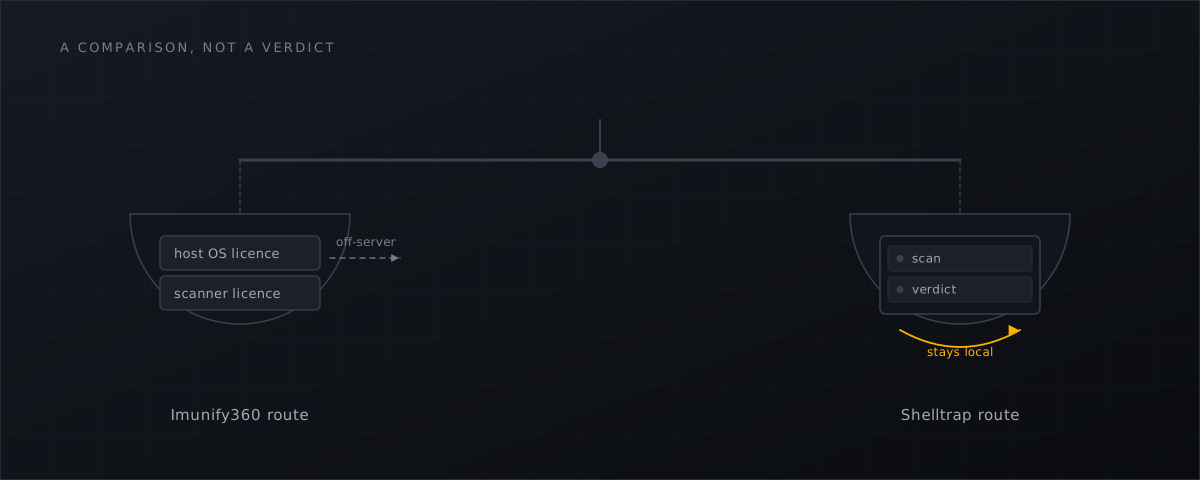
Both products scan a Linux hosting server for malware in real time. They are not the same purchase, and the differences that matter to a CyberPanel operator are not the ones on either vendor’s feature grid.
Everything below is sourced from the vendors’ own pages, checked on 4 September 2026. Prices and legal documents in this field change; re-check before you sign anything.
What each product is
Imunify360 (CloudLinux Software, Inc., US) is a security suite: malware scanning, a web application firewall, proactive defence, reputation management and automated cleanup, sold per server and licensed by the number of hosting accounts on that server. ImunifyAV is its free, detection-only sibling; ImunifyAV+ adds one-click cleanup at $7/month (ImunifyAV page ).
Shelltrap (Panomity GmbH, Bavaria) is narrower: a real-time webshell and exploit scanner with a synchronous PHP upload gate, quarantine with restore, per-domain policies and a CyberPanel plugin. It has no WAF and no automated site cleanup.
That difference is the first honest thing to say. If your requirement includes a WAF, Imunify360 covers ground Shelltrap does not, and no amount of price comparison changes that.
The CloudLinux question
This is the decisive point on CyberPanel, and it comes from CyberPanel’s own documentation rather than from us:
Imunify360 is available with CyberPanel v2.0.0, but before using it you need to convert your operating system to CloudLinux OS.
(CyberPanel knowledge base , published 24 November 2023.) So the documented route on a stock AlmaLinux or Ubuntu host is two purchases and an operating-system migration.
The free tier does not route around it. ImunifyAV’s documentation lists the supported control panels as cPanel, Plesk and DirectAdmin. CyberPanel is not among them.
Phrase this precisely. Not supported is not the same as does not work — people run Imunify on CyberPanel unofficially, and it functions. But “unofficially” is a poor answer to give a customer during an incident, and a worse one to write into a supplier questionnaire.
Shelltrap installs from signed .deb and .rpm packages on the CyberPanel-supported platforms — Ubuntu 20.04/22.04/24.04, AlmaLinux, RockyLinux and RHEL 8/9/10, CloudLinux 8, CentOS 9 — with no OS conversion. Debian carries only third-party support in CyberPanel itself and is therefore not promised. Capability is probed at runtime, and the host is placed in a visible tier; see the installation documentation
.
For completeness: CyberPanel ships no first-party malware scanner, and its $59/year add-on bundle contains no security scanner either.
Price, with dates
| Product | Price | Unit | Checked |
|---|---|---|---|
| Imunify360 | $12–45 per month (1–4 servers) · $5–20 per month (5 or more) | per server, tiered by hosting accounts | 4 Sep 2026 |
| ImunifyAV | Free, unlimited servers, detection only | per server | 4 Sep 2026 |
| ImunifyAV+ | $7 per month | per server | 4 Sep 2026 |
| Imunify Email | 10% of the Imunify360 licence fee | per server | 4 Sep 2026 |
| ConfigServer cxs (for reference) | $60 one-time, lifetime updates | per server | archived 29 Aug 2025 |
| Shelltrap | see the pricing page | per server | — |
Two notes on reading the Imunify360 pricing page . Its tiering is by hosting accounts on the server, not by sites, and the licence is server-wide: it must cover all non-admin accounts. And the page’s static HTML renders the yearly figure beside the monthly label — it literally reads “For servers with a single hosting account $144 per month” — while the page’s own price table and the ImunifyAV page both give $12 as the monthly figure. Anyone quoting $144/month from a screenshot has misread the page, and we are not going to publish that number as though it were real.
For EUR-native buyers, a German reseller lists Imunify360 at 14,28 € / 29,75 € / 41,65 € / 53,55 € per month, footnoted as including statutory VAT (power-netz.de ). At 19% that is 12,00 € net — the USD list price carried across one-to-one. That is reseller pricing, not vendor list pricing, and should be labelled as such.
The structural point is worth stating plainly and once. cxs was $60 per server, once, with lifetime updates (archived product page , 29 August 2025). The category that replaced it is a subscription. Every operator migrating from cxs is comparing against that memory, and we would rather say so than pretend the comparison does not exist. The background is in what CXS operators should do next .
Data handling: the question to put in writing
This section states only what each vendor’s own documents say. It makes no claim about whether any vendor is lawful, safe or honest.
Imunify360’s technical documentation sets sends_file_for_analysis: True as the default — “send (True) (default value) or not (False) malicious and suspicious files to the Imunify team for analysis” — with max_mrs_upload_file at 10 MiB, and a separate cloud_assisted_scan: True that sends hashes (configuration reference
). The dashboard documentation
describes the same behaviour in the UI. Both settings are documented as switchable — this is opt-out, not opt-in. The identical default applies to ImunifyAV, so the free product is not the lighter option on this axis.
Its DPA (version December 2025) contains, in Annex 1(h): “For the Imunify360 product, any file with Personal Data will be deleted immediately upon identification.” Its Annex 2 lists sub-processors in Germany, Poland, Finland and the United States, with no region selector. Note that at least five DPA versions are live simultaneously with no changelog, so pin the version you cite.
Its EULA (effective 1 May 2026) describes the collected SysInfo as including “the names, sizes, and attributes of files” — file metadata.
That is a difference between two of the vendor’s own documents, and the fair way to put it is as a question, not an allegation: the technical documentation and the DPA indicate that file contents are sent for analysis by default, while the EULA describes file metadata. Buyers should ask CloudLinux which document governs, and get the answer in writing. For an in-scope hoster working through NIS2 supplier-contract requirements or an Art. 28 GDPR assessment, that is a material question, and asking it is not hostile — it is the assessment. We work through what those obligations actually require in NIS2, GDPR and malware scanning for hosting providers .
We also note, because it is relevant and not in our favour to omit: Imunify360’s documentation contains no GDPR statement, no data-residency statement and no EU-processing commitment that we could find. That is an absence, not a violation.
What Shelltrap does with files
The default profile transmits nothing outward. Outbound destinations are allow-listed. Sample and telemetry code is not loaded at all without opt-in, and a sample never leaves the server without case-specific administrator approval. The only outbound connections in normal operation are the signed signature feed and the licence check, both to Panomity servers in Germany. Scanning — ClamAV, YARA, hash sets and heuristics — runs in an unprivileged sandboxed worker on your own machine.
That is a design constraint, not a claim of superior detection. It removes a category of question from your Art. 28 assessment; it does not remove the need to run the assessment.
Where Imunify360 is the better fit
- You are already on CloudLinux OS, or converting is acceptable.
- You need a WAF, proactive defence and automated cleanup in one licence.
- You run cPanel, Plesk or DirectAdmin, where both Imunify products are officially supported.
- Cloud-assisted detection is a benefit in your risk assessment rather than a question in your procurement process.
What this means for CyberPanel operators
Settle the OS question before the price question. On stock CyberPanel, the documented Imunify360 route starts with a CloudLinux OS conversion. That cost and disruption belong in the comparison, not in a footnote.
Ask both vendors, in writing, what leaves the server. Ask for the specific document that governs, its version and its date. Any vendor who cannot answer that in a sentence has told you something.
Price per server, per year, over three years. A one-time $60 anchor and a monthly subscription only become comparable once you extend both across the life of the fleet.
Separate scanner from suite. If you need a WAF, buy a suite. If you need file-level detection on hosts that will never run CloudLinux OS, a scanner is the honest scope.
Re-check everything dated here. Prices, EULAs and defaults move. Every figure above carries 4 September 2026, and that is deliberate.
If the host runs cPanel rather than CyberPanel, do not carry the CloudLinux point across: it comes from CyberPanel’s own documentation and is a statement about CyberPanel. Everything else in this comparison does transfer — data handling in writing, per-server pricing over three years, scanner against suite. Shelltrap has supported cPanel/WHM since 0.3.0 as a beta, without a WHM plugin so far and with the PHP upload gate optional and off by default; the cPanel page sets out what that covers.
If the scanner-shaped part is what you are missing, the installation documentation shows what Shelltrap needs from your host, the cPanel page covers cPanel/WHM hosts, and the pricing page carries the commercial terms.
Frequently asked
Can I run Imunify360 on a stock CyberPanel server?
Not by the documented route. CyberPanel’s own knowledge base states that Imunify360 is available with CyberPanel v2.0.0 but that you must first convert your operating system to CloudLinux OS. People do run it unofficially; that is a different thing from supported.
Does Imunify360 upload customer files?
Its technical documentation and its DPA indicate that malicious and suspicious files are sent for analysis by default, up to 10 MiB, while its EULA describes the names, sizes and attributes of files. Both settings are documented as opt-out. Buyers should ask CloudLinux which document governs.
Does Shelltrap send files anywhere?
No. In the default profile nothing is transmitted outward, outbound destinations are allow-listed, and sample and telemetry code is not loaded without opt-in. A sample never leaves the server without case-specific administrator approval.
Is Shelltrap a like-for-like replacement for Imunify360?
No. Imunify360 is a suite that includes a WAF, proactive defence and automated cleanup. Shelltrap is a real-time file scanner with an upload gate, quarantine and restore. If you need the WAF layer, Imunify360 covers ground Shelltrap does not.
Sources
Every number, date and vendor claim in this article links to one of these.
- Imunify360 pricing page — accessed 2026-09-04
- ImunifyAV product page — accessed 2026-09-04
- ImunifyAV documentation — supported control panels — accessed 2026-09-04
- CyberPanel knowledge base: how to install and use Imunify360 on CyberPanel — accessed 2026-09-04
- Imunify360 configuration file description (sends_file_for_analysis, cloud_assisted_scan) — accessed 2026-09-04
- Imunify360 dashboard documentation (automatic file submission) — accessed 2026-09-04
- Imunify360 Data Processing Addendum, version December 2025 — accessed 2026-09-04
- Imunify360 EULA, effective 1 May 2026 — accessed 2026-09-04
- ConfigServer eXploit Scanner product page, Internet Archive snapshot 29 August 2025 — accessed 2026-09-04
- power-netz.de, Imunify360 reseller pricing (Germany, gross) — accessed 2026-09-04
- CyberPanel add-ons page — accessed 2026-09-04
More from the research desk
CXS alternatives in 2026: the honest field guide
ConfigServer closed on 31 August 2025. What replaced cxs, what the options cost as at 4 September 2026, and what runs on …
AnalysisCXS is gone: what CyberPanel operators should do next
Way to the Web closed on 31 August 2025. csf survived via GPLv3 forks, cxs did not. What that means for a stock …
GuidesCyberPanel malware scanner setup with Shelltrap
Install a host-level malware scanner on a stock CyberPanel server: requirements, signed packages, report-only first, and …
Shelltrap watches the files this article is about
Real-time detection, an upload gate in front of your PHP, explainable verdicts, and nothing leaving your server.