Guides
fanotify vs inotify for file monitoring
Two kernel APIs, two very different guarantees. What the man pages actually say about recursion, races, permission events and the caveats nobody quotes.
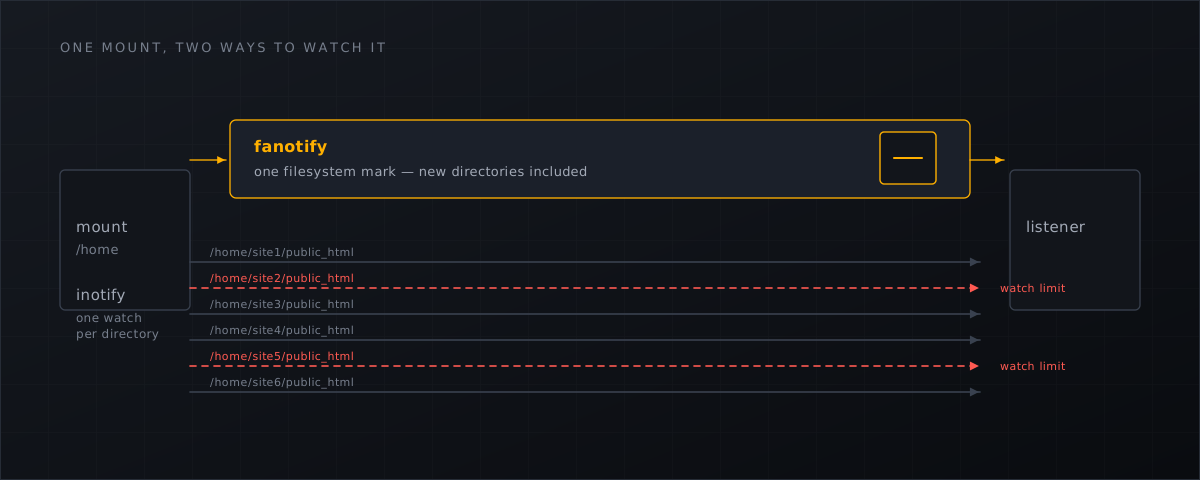
If a scanner claims real-time detection, it is using one of two kernel interfaces, and the difference between them decides what it can promise. Both are documented in detail by the kernel’s own man pages, which is a pleasant change from a field where most architecture claims are marketing.
inotify: notification, one directory at a time
inotify is the older and more widely used API. Its two structural limits are stated plainly in inotify(7) :
Inotify monitoring of directories is not recursive: to monitor subdirectories under a directory, additional watches must be created.
On a hosting server with a few hundred customer sites, that means one watch per directory across tens of thousands of directories, bounded by a per-user ceiling in /proc/sys/fs/inotify/max_user_watches. The man page states no default for that ceiling, so check it on your own distribution rather than trusting the numbers that circulate:
cat /proc/sys/fs/inotify/max_user_watches
There is also an inherent race when the tree changes underneath you. The man page’s own advice is to scan the directory you just started watching:
you may want to scan the contents of the subdirectory immediately after adding the watch
And the queue can overflow, which surfaces as IN_Q_OVERFLOW.
The last property is the one that matters most for a security control: inotify is a notification-only API with no permission-event mechanism. It tells you what happened. There is no response for your program to write back, so there is nothing to say “no”.
fanotify: notification and interception
fanotify(7) opens by describing itself as an API that “provides notification and interception of filesystem events”, and lists its advantages over inotify verbatim:
the ability to monitor all of the objects in a mounted filesystem, the ability to make access permission decisions, and the possibility to read or modify files before access by other applications.
Three clauses, three capabilities that a per-directory notification API does not have.
Whole-tree coverage without a race. The kernel uses the word itself:
Monitoring mounts offers the capability to monitor a whole directory tree in a race-free manner. Monitoring filesystems offers the capability to monitor changes made from any mount of a filesystem instance in a race-free manner.
One mark on the mount that carries /home covers every customer directory that exists now and every one created a second from now. No watch budget, no re-scan after adding a watch.
Permission events. FAN_ACCESS_PERM, FAN_OPEN_PERM and FAN_OPEN_EXEC_PERM are requests for a decision, not notifications of a fact:
Permission events are requests to the receiving application to decide whether permission for a file access shall be granted. For these events, the recipient must write a response which decides whether access is granted or not.
Denial makes the requesting syscall receive EPERM. That is the difference between a monitor and a guard, and FAN_OPEN_EXEC_PERM maps directly onto the case everyone cares about: do not let this newly written PHP file execute.
A version floor. Create, delete and move events, verbatim, “was added in Linux 5.1”. On-write detection is therefore a hard requirement of Linux ≥ 5.1 and belongs in system requirements, not in a support ticket.
The caveats, because a competitor knows them
Anyone selling fanotify-based detection should publish its gaps, all four of which are in the same man page.
Network filesystems are out of scope. “Fanotify reports only events that a user-space program triggers through the filesystem API. As a result, it does not catch remote events that occur on network filesystems.”
Memory-mapped writes are invisible. “The fanotify API does not report file accesses and modifications that may occur because of mmap(2), msync(2), and munmap(2).”
The queue can overflow. “The event queue can overflow. In this case, events are lost.” Under a heavy write burst — a large deploy, a restore, a migration — events are dropped. Real-time watching must therefore be paired with a periodic full sweep, and a vendor that claims pure real-time coverage without one is describing something the kernel does not offer.
It needs
CAP_SYS_ADMIN, and that is a risk in itself. The man page is explicit:When an event is generated, no check is made to see whether the user ID of the receiving process has authorization to read or write the file before passing a file descriptor for that file. This poses a security risk, when the CAP_SYS_ADMIN capability is set for programs executed by unprivileged users.
That last paragraph is an architecture requirement, not a footnote. It is why Shelltrap keeps the privileged listener in a thin broker that does no parsing, and does all file parsing and scanning in an unprivileged worker under namespaces and Landlock. The component holding CAP_SYS_ADMIN is the one you want to be small and boring.
This is the mainstream choice, not an exotic one
Worth knowing if you are evaluating vendors: Imunify360’s configuration documentation
describes its own real-time scanning as using “fanotify as the primary monitoring mechanism (kernel 3.10+) with legacy inotify fallback”. The market leader made the same call. Free tooling has generally stayed on inotify — maldet
batches inotify events with an inotify_sleep default of 15 seconds.
What the interval difference actually looks like
Two documented vendor defaults, four orders of magnitude apart:
| Mechanism | Documented default detection interval |
|---|---|
maldet, inotify_sleep (event batch) | 15 seconds |
| Wordfence free tier, full scan | every 72 hours, plus up to an hour of jitter |
| Wordfence Premium, full scan | every 24 hours |
Wordfence’s own scan documentation states it, verbatim: “If you are using the free version of Wordfence, a quick scan runs every day, and a full scan runs every 72 hours” (Wordfence scan documentation ), and recommends dropping to weekly on resource-constrained hosts. Set that against Patchstack’s measured weighted median time to first exploitation of five hours and the shape of the problem is clear: on a periodic scan cadence the worst-case gap between a shell being written and anything noticing is longer than the median time for a vulnerability to be mass-exploited. Neither figure is an estimate; both are the vendors’ own defaults.
What runs on your host is a question, not an assumption
Shelltrap resolves the capability question by probing, and reports the result as a tier: A for the full fanotify watcher with file-handle reporting, B for fanotify without file identifiers, C for a container-style fallback on budgeted inotify watches plus a checkpointing crawler, D for no usable backend and therefore no real-time promise at all.
shelltrapd --config /etc/shelltrap/shelltrap.toml --check | python3 -m json.tool | head -40
Read diagnostic.tier as well as tier: an explicitly configured backend can make the top-level value reflect your configuration rather than the machine. The tier table and the mount-level diagnostics are documented in the installation docs
.
What this means for CyberPanel operators
- Ask any vendor which API their real-time mode uses, and on which kernel. “Real-time” over inotify on a host with tens of thousands of directories is a different product from a mount-wide fanotify mark.
- Ask what happens when the queue overflows. If the answer is not “a periodic full sweep catches up”, the coverage claim is thinner than it sounds.
- Check your own host’s tier after installation instead of assuming it from a kernel version; overlay filesystems, containers and missing capabilities all change the answer.
- Keep the periodic sweep enabled in production even when real-time watching is healthy — it is the safety net for the documented gaps, not a redundancy.
- If you want the permission-event side of this for uploads specifically, see how the PHP upload gate works ; the broader case for putting detection below the application is in why server-level webshell detection .
Shelltrap watches your customer mounts with fanotify where the host allows it, states the tier it actually achieved, and pairs it with a scheduled sweep. See what it does .
Frequently asked
Is fanotify simply better than inotify?
For whole-tree monitoring on a hosting server, yes — it watches mounts race-free and can make access decisions. For a single directory in an unprivileged process it is the wrong tool, because fanotify needs CAP_SYS_ADMIN and inotify does not.
What kernel do I need?
fanotify create, delete and move events were added in Linux 5.1, so on-write detection needs at least that. What actually decides is the runtime probe, not the version string: the installer tests the capabilities on your host and reports a tier.
Can real-time watching miss a file?
Yes. The fanotify man page states the event queue can overflow and events are then lost, and it does not report modifications made through mmap, msync or munmap. Real-time watching therefore has to be paired with a periodic full sweep; anyone claiming pure real-time coverage is overselling the API.
Sources
Every number, date and vendor claim in this article links to one of these.
- fanotify(7) — Linux manual page — accessed 2026-09-04
- inotify(7) — Linux manual page — accessed 2026-09-04
- Imunify360 documentation (configuration reference) — accessed 2026-09-04
- Linux Malware Detect (maldet) project repository — accessed 2026-09-04
- Wordfence scan documentation — accessed 2026-09-04
- Patchstack, State of WordPress Security in 2026 (covering 2025) — accessed 2026-09-04
More from the research desk
Linux Malware Detect (maldet) vs Shelltrap
maldet is free, GPL-2.0 and still shipping releases. The real question is the signature feed behind it — measured, with …
AnalysisWhy webshell detection belongs on the server, not the site
Plugin scanners share the fate of the process they run in. What kernel docs, MITRE, the NSA repo and the BSI say about …
ComparisonsWordfence vs a server-level scanner
An in-process PHP scanner shares the fate of the process it runs in. The architectural differences, from both vendors' …
Shelltrap watches the files this article is about
Real-time detection, an upload gate in front of your PHP, explainable verdicts, and nothing leaving your server.