Comparisons
Wordfence vs a server-level scanner
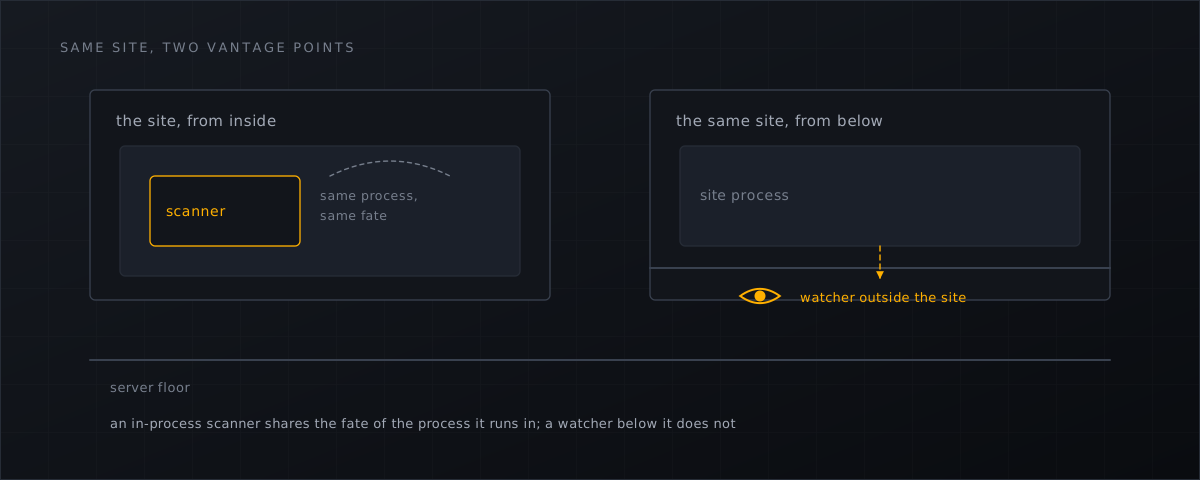
An in-process PHP scanner shares the fate of the process it runs in. The architectural differences, from both vendors' own docs and Sucuri's casework.
This comparison has to start with a disclaimer, because the topic invites bad-faith versions of itself.
This is an architectural argument, not a quality one. Wordfence is a good product. It does things a server-side file scanner does not do at all: it filters requests with WordPress context, it maintains vulnerability intelligence about specific plugins, and it puts all of that in front of a site owner who has no shell access. Nothing below asserts that Wordfence does not work, and any comparison that did would be wrong.
What follows is about where a scanner runs, and what that implies.
What Wordfence’s own documentation says about its constraints
Wordfence’s scan troubleshooting documentation
describes the scanner as “a PHP application”, defaults it to max_execution_time / 2, and lists the host conditions that stop it:
If your web host has set an Apache configuration variable that limits process execution time or if they have a “killer daemon” that kills long-running processes…
and, on resources:
Some hosts limit memory across multiple processes or may have CPU usage limits over a period of time. These limits are not always obvious since they may not cause error messages in your PHP error logs, and may make the scan appear to just stop working.
That last sentence is the important one for a hosting provider: the documented failure mode is silence. Wordfence also documents that the default scan scope is the WordPress root, and that widening it is the change most likely to make a scan fail on a constrained host.
The cadence is documented too, verbatim :
If you are using the free version of Wordfence, a quick scan runs every day, and a full scan runs every 72 hours.
Premium runs a full scan every 24 hours, and the documentation recommends dropping to weekly on resource-constrained hosts.
None of that is a defect. It is what running inside a shared PHP process on someone else’s hosting plan means.
What attackers do about in-site security tooling
Sucuri’s incident-response team — a third party with no stake in our product, though it does sell server-side scanning of its own — has published casework on malware that targets security plugins directly. A 2020 write-up documented a kill-loop that disables named security plugins on every request from outside the plugin directory; two later cases went after the scanner itself.
In October 2022
, Ben Martin documented malware that modified wordfence.php and lib/wordfenceScanner.php to surgically delete two warning strings — “This file appears to be installed or modified by hacker to perform malicious activity” and “File appears to be malicious or unsafe” — and manipulated site_transient_update_plugin so the administrator could not see that the plugin was out of date. Three backdoors were concealed, one of them in wp-includes/Requests/Transport/: a core directory, where only integrity comparison against known-good finds it.
In July 2024 a variation took a simpler route. A fake plugin “renames the WordFence plugin directory to ‘wordfence1’ thereby disabling the plugin entirely”, creates an administrator account, and — the detail that lands hardest —
It searches for options ‘Scan theme files’ and ‘Scan plugin files’ and changes their style to make them look enabled (without changing the actual option).
The settings look on. A rename() is one filesystem operation available to anything running as the site user; no exploit of the scanner is required, and no defect in the scanner is implied.
Sucuri’s own conclusion in that write-up is the cleanest statement of the architecture problem:
It would be helpful to have a file integrity monitoring service that resides mostly outside of the environment itself, like our server side scanning solution.
Three things a per-site scanner structurally cannot do
See other accounts. This one is trivially true — Unix permissions, plus, where it is deployed, CloudLinux’s CageFS, which exists to ensure that a user “will not see any other users, and would have no way to detect presence of other users & their user names on the server”. That is not a vendor admission of a weakness; it is the isolation working as designed. It does mean a per-tenant scanner cannot be the host’s detection layer. See shared hosting cross-account risk .
Survive being switched off by the account it protects. BSI IT-Grundschutz OPS.1.1.4.A5 requires as a Basis measure that users cannot make security-relevant changes to the malware scanner’s settings (IT-Grundschutz OPS.1.1.4 ). Anything living in a directory the tenant can write to has a hard time meeting that; a daemon running outside the tenant’s reach meets it by construction. For German hosters that is a sourced compliance argument, not a preference.
Watch a write as it happens. A per-site scan is periodic by design. A host-level watcher sees the file appear.
The interval arithmetic
| Documented default | |
|---|---|
maldet
inotify_sleep event batch | 15 seconds |
| Wordfence free tier, full scan | every 72 hours, plus up to an hour of jitter |
| Wordfence Premium, full scan | every 24 hours |
Roughly four orders of magnitude between the ends of that table, from both vendors’ own defaults. Set against Patchstack’s measured weighted median time to first exploitation of five hours , the free tier’s worst-case window between a shell being written and a full scan noticing is longer than the median time for a vulnerability to be mass-exploited.
That is not a reason to remove the plugin. It is a reason not to treat it as the host’s detection layer.
The licensing arithmetic, stated without inflation
Wordfence Premium, Care and Response are $149, $590 and $1,250 per site per year (checked 4 September 2026). On a 250-site server, Premium alone would arithmetically come to $37,250 a year.
That number is a structural observation about per-site versus per-server licensing, not a claim that any hoster pays it — in practice site owners buy their own licences, and most do not buy any. The point is only that per-site pricing does not scale to a hosting platform’s economics, which is why the two categories exist.
Prevention at one layer is not a plan
Patchstack’s testing of hosting-provider WAFs found that only 12% of WordPress-specific vulnerability attacks were blocked , and 26% in a broader test. Read that carefully: it measures hosting-provider WAFs in a pentest, and it is evidence that prevention at any single traffic-filtering layer is unreliable. It is not evidence that hosts are bad, and it is not an argument against plugins or WAFs — Patchstack’s own explanation is that broken access control, the most exploited category, “look[s] like normal authenticated traffic with no obvious injection patterns”.
The conclusion that follows is a layering one: filter what you can, and detect on the filesystem what gets through.
Use both, and know which does what
| Per-site plugin | Host-level scanner | |
|---|---|---|
| Sees WordPress context (logins, requests, known plugin CVEs) | Yes | No |
| Sees writes into the web root as they happen | No | Yes |
| Sees other accounts on the same server | No | Yes |
| Survives the site user renaming its directory | Documented cases say no | Outside the tenant’s reach |
| Scan cadence | Documented default: 72 h free / 24 h Premium | Event-driven plus scheduled sweep |
| Licensed per | Site | Server |
What this means for CyberPanel operators
- Keep the plugin where customers already run it, and stop treating its green tick as your assurance that a site is clean.
- Put the integrity control below the tenant boundary, where a
rename()by the site user cannot reach it — the reasoning is in why server-level webshell detection . - On any cleanup, verify core and plugin checksums yourself instead of trusting the in-site scanner’s verdict; the sequence is in the server-side backdoor removal checklist .
- Price the two layers separately: per-site plugins are the site owner’s purchase, per-server detection is yours.
- The installation path for the host-level layer on CyberPanel is in the installation docs , and on cPanel/WHM in the cPanel section .
- The same split applies on cPanel. A per-site plugin cannot see across accounts there either, and a plugin inside a compromised site is still inside the blast radius. Shelltrap’s host-level layer has supported cPanel/WHM since 0.3.0 as a beta — what that covers .
Shelltrap runs as a host-level daemon outside every customer account, watches writes, and cannot be renamed away by the site it is watching. See what it does .
Frequently asked
Are you saying Wordfence does not work?
No, and that claim would be wrong. Wordfence is a good product with a firewall and vulnerability intelligence that a file scanner does not have. The argument here is architectural: a scanner that runs as a PHP application inside the site it defends shares that site’s limits and that site’s fate.
Should we drop the plugin if we run a host-level scanner?
No. They cover different layers. The plugin sees WordPress context — logins, requests, known plugin vulnerabilities; the host-level daemon sees writes, other accounts and files outside the WordPress root. Losing either loses coverage.
What is the actual detection-time difference?
Wordfence documents a full scan every 72 hours on the free tier, plus up to an hour of jitter, and every 24 hours on Premium. maldet’s inotify batch default is 15 seconds. Both figures are the vendors’ own defaults rather than benchmarks.
Sources
Every number, date and vendor claim in this article links to one of these.
- Wordfence — scan scheduling documentation — accessed 2026-09-04
- Wordfence — scan options documentation — accessed 2026-09-04
- Wordfence — scan troubleshooting documentation — accessed 2026-09-04
- Wordfence plans and pricing (official landing page) — accessed 2026-09-04
- Sucuri — WordPress malware disables security plugins to avoid detection (2020) — accessed 2026-09-04
- Sucuri — Wordfence evasion malware conceals backdoors (Ben Martin, 20 October 2022) — accessed 2026-09-04
- Sucuri — new variation of Wordfence evasion malware (Ben Martin, 5 July 2024) — accessed 2026-09-04
- Patchstack, State of WordPress Security in 2026 (covering 2025) — accessed 2026-09-04
- CloudLinux OS components documentation (CageFS) — accessed 2026-09-04
- BSI IT-Grundschutz-Kompendium 2023 — OPS.1.1.4 Schutz vor Schadprogrammen (PDF) — accessed 2026-09-04
- Linux Malware Detect (maldet) project repository — accessed 2026-09-04
More from the research desk
fanotify vs inotify for file monitoring
Two kernel APIs, two very different guarantees. What the man pages actually say about recursion, races, permission …
ComparisonsLinux Malware Detect (maldet) vs Shelltrap
maldet is free, GPL-2.0 and still shipping releases. The real question is the signature feed behind it — measured, with …
GuidesShared hosting: the cross-account risk
Isolation and blindness are one property seen from two sides. What CageFS protects, what a per-tenant scanner cannot …
Shelltrap watches the files this article is about
Real-time detection, an upload gate in front of your PHP, explainable verdicts, and nothing leaving your server.