Guides
WordPress backdoor removal: a server-side checklist
Cleaning a hacked WordPress site from the host, in order: preserve evidence, contain, inventory, check the neighbours, patch, and prove it stayed clean.
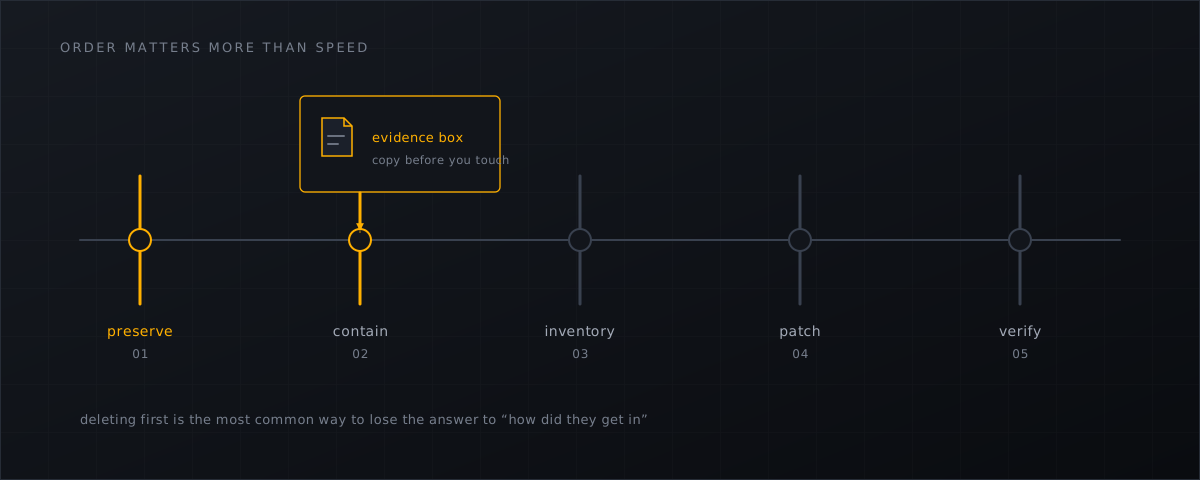
Most WordPress cleanups fail in one of two ways: the operator deletes the evidence before understanding it, or the operator cleans the site and not the account. This checklist is written for the host, where you can do both properly.
The reason this order matters is in Sucuri’s 2023 Hacked Website Report, verbatim :
In 2023, 49.21% of compromised websites were discovered to contain at least one backdoor at the time of infection. Our team successfully removed 21,062 backdoors from these infected sites.
That is 2023 data — the last edition with cleanup figures — and it makes the point that the visible damage is rarely the mechanism. Wordfence’s 2024 report lands in the same place from its own dataset: its second most-detected malware that year was “a generalized obfuscated backdoor”, on 78,500 sites.
1. Preserve before you touch
Copy or quarantine before deleting. You will need the file to answer three questions that come up later: what it did, when it arrived, and whether the same thing is on other accounts.
mkdir -p /root/ir/example.com/2026-09-04
sha256sum /home/example.com/public_html/wp-content/uploads/wp_cache.php \
  | tee -a /root/ir/example.com/2026-09-04/hashes.txt
cp -a /home/example.com/public_html/wp-content/uploads/wp_cache.php \
  /root/ir/example.com/2026-09-04/
If your scanner quarantines rather than deletes, this step is already done, with the original owner, mode and timestamps recorded; the reasoning is in quarantine or delete .
2. Contain, without destroying the evidence
- Put the site into maintenance or restrict it at the web-server level rather than deleting its files.
- Rotate every credential that touches the account: panel user, SSH and SFTP, database, and the WordPress administrators.
- Invalidate active sessions. On WordPress this is easiest through the salts:
sudo -u example wp config shuffle-salts --path=/home/example.com/public_html
sudo -u example wp user list --role=administrator --path=/home/example.com/public_html
An administrator account nobody recognises is a finding, not a curiosity — documented cases
include one created as officialwp, alongside a payload stored in the database under an _hdra_core option.
3. Inventory the filesystem
Run the sweep against the whole account, not the one file that was reported. The full command set is in find webshells on a CyberPanel server manually ; the short list is:
- every
.php,.phtmland.pharunderwp-content/uploads/; - every
.htaccesscontainingAddType,AddHandler,SetHandlerorphp_value; - everything with a recent
ctime, not just a recentmtime; - the contents of
wp-content/mu-plugins/, which auto-load and never appear in the plugins screen.
Then compare against known-good. The NSA’s repository puts this first among methods, verbatim :
The most effective method of discovering most web shells is to compare files on a production web server with a known-good version of that application, typically a fresh install of the application where available updates have been applied.
sudo -u example wp core verify-checksums --path=/home/example.com/public_html
sudo -u example wp plugin verify-checksums --all --path=/home/example.com/public_html
Core matters more than it looks. In Sucuri’s 2022 case
one of three concealed backdoors sat in wp-includes/Requests/Transport/ — a core directory, where only integrity comparison surfaces it.
4. Do not accept the site’s own verdict
The same Sucuri write-up documents malware that modified wordfence.php and lib/wordfenceScanner.php to surgically delete the two warning strings “This file appears to be installed or modified by hacker to perform malicious activity” and “File appears to be malicious or unsafe”, and manipulated the update transient so the plugin never looked out of date. A 2024 variation
simply renamed the plugin directory to wordfence1, created an admin user, and — the detail worth remembering —
It searches for options ‘Scan theme files’ and ‘Scan plugin files’ and changes their style to make them look enabled (without changing the actual option).
None of that is a criticism of the plugin’s detection quality; it is a structural observation about running your integrity check inside the thing being checked. The architecture argument is in Wordfence versus a server-level scanner .
5. Check the database, not only the disk
Not every persistence mechanism is a file. Look at the options table for injected script tags and at any recently added administrator:
sudo -u example wp db query \
  "SELECT option_name FROM wp_options WHERE option_value LIKE '%<script%' LIMIT 20;" \
  --path=/home/example.com/public_html
Adjust the table prefix if the site does not use wp_. A campaign that lives entirely in the database leaves nothing for a filesystem scanner to find, which is exactly why this step is on the list.
6. Check the neighbours
Cleaning one site and leaving the backdoor next door is the most common reason a site comes back infected two days later. Sweep every site in the same Linux account, then the rest of the server, using the same indicators — filename, SHA-256, .htaccess pattern. What the isolation boundaries do and do not protect against is covered in shared hosting cross-account risk
.
7. Fix the way in
Patchstack’s 2025 edition recorded that wordpress.org closed 1,614 plugins and themes in 2024. Abandoned software is not a maintenance issue on a hosting platform, it is the entry point:
- update core, plugins and themes;
- remove anything deactivated and unused — deactivated plugins are still on disk and still reachable in some exploit chains;
- replace anything closed or abandoned upstream;
- re-check the upload paths that were used, and block PHP execution under
wp-content/uploads/.
8. Verify, then keep watching
Re-run the inventory, confirm the checksums are clean, and take the site out of maintenance. Then keep the account under observation for at least 30 days. Reinfection is the signal that you missed something — usually a second backdoor, sometimes a neighbouring site, occasionally a credential you did not rotate.
9. Write it down while it is fresh
If you are a hosting provider in Germany, this is not only good practice. § 32 BSIG sets a 24-hour early warning, a 72-hour notification including indicators of compromise, and a final report within one month for entities in scope (BSIG 2025
). The evidence base for that report is the material you preserved in step 1 and the logs of your security tooling — which is another reason not to rm the file at 23:00 and reconstruct the story afterwards.
Record: first observed time, file paths and hashes, entry point if known, accounts affected, actions taken, credentials rotated, and the date the site was released.
What this means for CyberPanel operators
- Make “quarantine, hash and record” the first action in your runbook, ahead of deletion — for the incident report as much as for the cleanup.
- Clean the account, never the single file; then re-check the account’s other sites and the server.
- Verify core and plugin checksums on every cleanup. It is one command and it finds the modifications that greps miss.
- Keep the account under observation for a month afterwards, with alerting on new writes into web roots rather than a weekly manual look.
- Store the incident record with the tooling logs that support it; § 32 BSIG deadlines are short and start when you notice, not when you finish. Continuous coverage afterwards is set up as described in the installation docs .
Shelltrap keeps the original file, its metadata and a hash-chained audit entry for every action, so the cleanup and the report come from the same record. See what it does .
Frequently asked
Can I just restore a backup?
Only if you know when the compromise started, and only if you fix the entry point first. Restoring to a point after the initial access reinstates the backdoor; restoring without patching invites the same exploit back. Restore plus patch plus a fresh scan, in that order.
The site's own security plugin says it is clean. Is it?
Treat that as one input, not as the answer. Sucuri has documented malware that edited the scanner’s own source to delete its warning strings, and later malware that renamed the plugin directory while restyling the scan settings so they still looked enabled.
Do I have to report the incident?
Possibly. In Germany, § 32 BSIG sets a 24-hour early warning, a 72-hour notification and a final report within one month for entities in scope of NIS2. Whether you are in scope depends on your category and size, not on how bad the incident felt.
Sources
Every number, date and vendor claim in this article links to one of these.
- Sucuri, 2023 Hacked Website Report — accessed 2026-09-04
- Wordfence, 2024 Annual WordPress Security Report — accessed 2026-09-04
- Sucuri — Wordfence evasion malware conceals backdoors (Ben Martin, 20 October 2022) — accessed 2026-09-04
- Sucuri — new variation of Wordfence evasion malware (Ben Martin, 5 July 2024) — accessed 2026-09-04
- nsacyber/Mitigating-Web-Shells (NSA repository) — accessed 2026-09-04
- Patchstack, State of WordPress Security in 2025 (covering 2024) — accessed 2026-09-04
- Sucuri — hidden malware strikes again: mu-plugins under attack — accessed 2026-09-04
- BSI-Gesetz 2025 (consolidated text, § 32 reporting duties) — accessed 2026-09-04
More from the research desk
CyberPanel's security history, and what it teaches operators
Three pre-auth RCEs, a ransomware wave, a quiet 2025 and a busy 2026. What is verified about CyberPanel's incidents, and …
GuidesFalse positives on WordPress core, and what to do
Which WordPress files trip generic malware heuristics, why entropy alone is a bad signal, and how to tune a host-level …
GuidesFind webshells on a CyberPanel server manually
A root-level triage playbook with find, grep, YARA and clamscan for CyberPanel hosts, including the honest limits of …
Shelltrap watches the files this article is about
Real-time detection, an upload gate in front of your PHP, explainable verdicts, and nothing leaving your server.