Guides
False positives on WordPress core, and what to do
Which WordPress files trip generic malware heuristics, why entropy alone is a bad signal, and how to tune a host-level scanner without going blind.
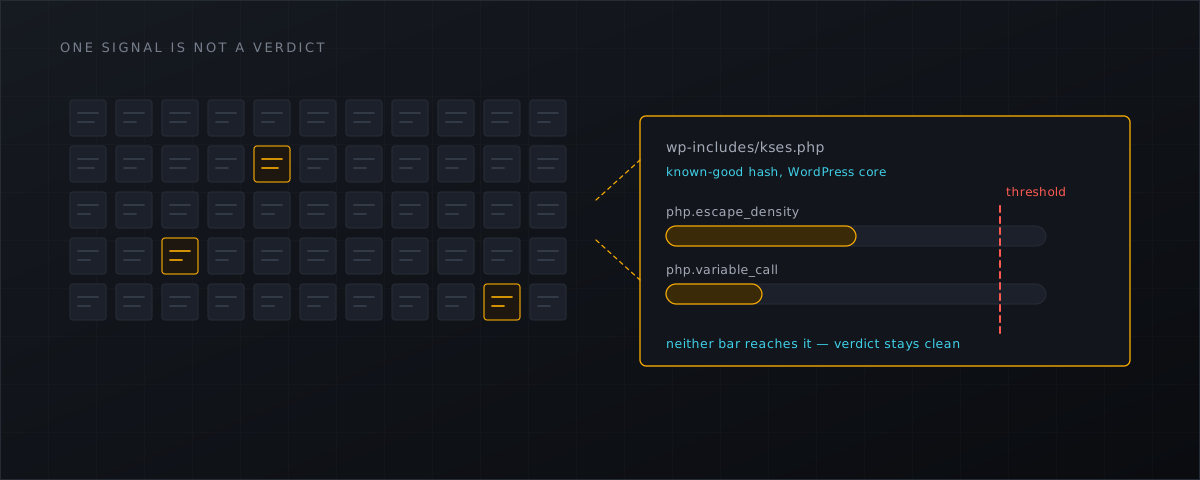
Every discussion of malware scanners is about detection. Every actual deployment is about false positives, because that is the failure mode your customers experience. This article is about which files trip generic heuristics on a WordPress host, why that happens, and what the tuning path looks like.
The trade-off is structural, and the NSA says so
Broad detection rules — the ones that look for obfuscation, encoding and dynamic code construction rather than a known sample — buy coverage with noise. The NSA’s own web-shell repository says it of its own extended rule set, verbatim :
are likely to produce a significant number of false positive results
That single sentence is worth keeping in mind when a vendor promises heuristic detection with no false positives. It also justifies a tiered design: cheap high-confidence checks first (hash sets, signatures), expensive heuristics gated behind them, and a verdict that names which signals fired instead of a mystery score.
What actually fires on a WordPress host
These are observations from our own report-only test stage on a Panomity CyberPanel host on 3 September 2026 — one host, real customer data, engineering notes rather than a study.
WordPress core and its bundled libraries. The files that repeatedly reached a suspicious score were core files: PHPMailer, SimplePie, kses.php and html5-named-character-references.php. They combine a high escape density with variable function calls and dynamic evaluation patterns — the same shape as a hand-obfuscated dropper, for entirely legitimate reasons. Our follow-up work is the obvious one: a known-good allow-list for WordPress core built from the wordpress.org checksums, plus lower weighting for the escape-density signal.
Minified and generated assets. Long lines and high entropy describe a packed payload and a minified bundle identically. Our conclusion was that entropy or a single long line must never produce a suspicious verdict on its own, and an image file must contain an explicit PHP tag with code before it is scored at all. An earlier build scored JPEGs on the presence of <? bytes plus entropy; that was a bug, and it is the kind of bug every heuristic engine has once.
Security plugin state files. Wordfence’s own wflogs/config-transient.php is a good example: a serialised state file that looks statistically odd and is entirely normal.
Mail spools. ClamAV flagged Heuristics.Phishing.Email.SpoofedDomain on a message under /home/vmail/<domain>/<user>/Maildir/cur/ — twice, because Dovecot renames the file when it sets the Seen flag (:2, becomes :2,S) and the rename looks like a new file. The fix is not a better rule: mail is already scanned at delivery, so mail spools do not belong in a web-root watcher’s scope, and repeated findings with the same SHA-256 inside a short window should be collapsed into one.
Operational noise that is not detection at all. Early on, degraded results and files skipped for size limits each produced their own finding, which flooded the per-account cap. A scanner has to distinguish “this file is suspicious” from “this file was not scanned”; conflating them destroys the signal-to-noise ratio faster than any bad rule.
Never reinterpret “unscanned” as “clean”
The counterpart to false positives is the false negative you create by accident. If clamd is unreachable, a file is larger than the configured limit, or a worker dies, the correct verdict is unscanned or degraded — never clean. Shelltrap keeps those verdicts distinct in findings, in the status summary and in health, and the upload gate treats them as neither an allow reason nor a deny reason on their own.
shelltrap health reporting degraded is an operating fault. It is the one alert you should never route to a folder you do not read.
The tuning path
1. Report-only, and count. For the first week, every hit is a finding and nothing moves. Verify each malicious finding by hand and write down how many were wrong. That number, not a vendor’s detection claim, tells you which engines can be trusted to act. The whole sequence is in the report-only first week
.
2. Promote engines separately. Signature and hash hits are high-confidence; heuristics are not. Per domain:
curl --silent --unix-socket /run/shelltrap/api.sock -X PUT \
  -H 'Content-Type: application/json' \
  -H 'X-Request-ID: 8c2f4f1b8d0a4c6f9c9d3f2a1b0e7d64' \
  --data '{"signature.action":"quarantine","hash.action":"quarantine","heuristics.action":"report"}' \
  http://localhost/v1/policies/domain/42
heuristics.threshold moves the bar for the heuristic engine when you need it looser or tighter for a particular customer.
3. Use ignores, and understand what they do. Ignore rules come in four kinds — path_glob, signature, hash and user — and they suppress the action, never the scan or the record:
curl --silent --unix-socket /run/shelltrap/api.sock -X POST \
  -H 'Content-Type: application/json' \
  -H 'X-Request-ID: 4a1c0d9e6f2b4b8ca7d5e3f109b28c47' \
  --data '{"scope":"domain","scope_id":"42","kind":"path_glob","value":"cache/**","note":"generated cache"}' \
  http://localhost/v1/ignores
shelltrap ignore list
That distinction matters. An ignore that silenced the scan would turn a tuning decision into a permanent blind spot; an ignore that silences the action leaves the evidence in place if the same path is used against you later.
4. Resolve findings honestly. Marking a finding as a false positive is an audited action, which is how you build a record of what your fleet actually looks like:
curl --silent --unix-socket /run/shelltrap/api.sock -X POST \
  -H 'Content-Type: application/json' \
  -H 'X-Request-ID: 9b7e2c1a5d3f4e6b8c0a1d2e3f405162' \
  --data '{"resolution":"false_positive"}' \
  http://localhost/v1/findings/<id>/resolve
The CLI offers the same actions (shelltrap ignore add|list|remove, shelltrap findings resolve) against the same socket.
5. Exclude what should never have been in scope. scan.exclude per domain or account, for mail spools, backup dumps and directories where a customer legitimately generates thousands of files a minute.
Test rule sets before they reach customer data
A rule set is a change to production behaviour and deserves the same treatment as a code deploy. Two checks are worth building into the process.
Measure against a public corpus, and report both halves. bartblaze/PHP-backdoors is CC0 and split into obfuscated and deobfuscated samples; a detection rate quoted only against the deobfuscated half is close to meaningless.
Then gate the activation. Shelltrap will not activate a signature generation unless it has been compiled and run against both a known-good corpus and a known-bad corpus: a single malicious verdict on the good corpus is a hard failure, and the detection ratio on the bad corpus is recorded as a metric that warns below 90%. How generations are signed, gated and rolled back is described in signed signature feeds explained
.
Remember also that engines differ in what they are for. ClamAV’s documentation states plainly that it “is not a traditional anti-virus or endpoint security suite” — it is one signal among several, and its behaviour on PHP depends entirely on which third-party feed you loaded.
What this means for CyberPanel operators
- Measure your own false-positive rate during a report-only week; do not adopt anyone else’s number, including ours.
- Promote the high-confidence engines to
quarantinefirst and leave heuristics reporting for as long as it takes to trust them. - Prefer ignores that suppress actions over exclusions that suppress scanning, and record why each one exists.
- Alert on
degradedand onunscannedvolume, not only on malicious findings — a scanner that is quietly not scanning is worse than a noisy one. - Manual verification commands for checking a finding by hand are in find webshells on a CyberPanel server manually ; the health and policy commands are in the installation docs .
Shelltrap names the signals behind every verdict, including their rule author and licence, so a finding can be argued with rather than believed. See what it does .
Frequently asked
Why does minified JavaScript look like malware?
Because the cheap generic signals — very long lines, high character entropy, low whitespace ratio — describe packed payloads and minified assets equally well. That is an argument for never letting those signals produce a verdict on their own, not for excluding assets from scanning.
Does an ignore rule stop the file being scanned?
Not in Shelltrap. Ignore rules suppress the action, never the scan or the record. You still get the finding in the list; the scanner simply does not act on it. That keeps a mistaken ignore from turning into a blind spot.
What false-positive rate should I expect?
Nobody can answer that for your fleet honestly, because it depends on what your customers run. Measure it yourself during a report-only week and write it down — it is the number that decides which engines you promote to quarantine first.
Sources
Every number, date and vendor claim in this article links to one of these.
- nsacyber/Mitigating-Web-Shells (NSA repository) — accessed 2026-09-04
- bartblaze/PHP-backdoors — obfuscated and deobfuscated sample corpus — accessed 2026-09-04
- ClamAV documentation — accessed 2026-09-04
More from the research desk
ClamAV alone is not enough for webshells
ClamAV says so itself. What the engine covers, where PHP webshell detection actually comes from, and what a layered …
GuidesHow webshells get into WordPress uploads
Arbitrary file upload, polyglots and .htaccess handler abuse: the routes a PHP backdoor takes into wp-content/uploads, …
AnalysisThe WordPress webshell wave, 2024–2026: what the data shows
Sourced campaigns, CVE chains and file-level indicators from the 2024–2026 WordPress backdoor wave — with the dates, the …
Shelltrap watches the files this article is about
Real-time detection, an upload gate in front of your PHP, explainable verdicts, and nothing leaving your server.