Product
Shelltrap in report-only mode: the first week
What a real report-only rollout looks like: the install order, the eight numbers to watch, the abort criteria and what our own first host actually did.
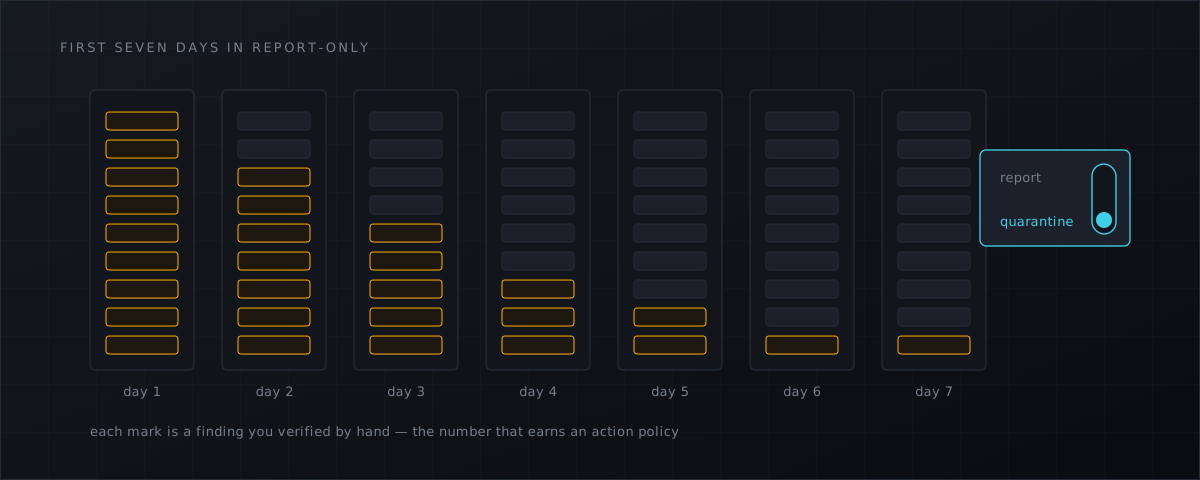
This is what the first week with a host-level scanner actually looks like, taken from our own internal test stage on a production CyberPanel host on 3 September 2026 — not from a lab, and not from a slide.
The principle is simple: report, never act. Every action set to report, no automatic quarantine, no PHP adapter, and a rollback that is two commands. The NSA’s own web-shell repository gives the same advice for its blocking rules — tailor them and add exceptions before enforcing (nsacyber/Mitigating-Web-Shells
).
Day 0: the order that worked
1. Resource limits before the daemon exists. The package starts the service during installation, so the drop-in goes in first. These values are from that one host; size yours to your machine:
install -d /etc/systemd/system/shelltrapd.service.d
printf '[Service]\nCPUQuota=200%%\nIOWeight=50\nNice=10\nMemoryHigh=6G\nMemoryMax=8G\n' \
  > /etc/systemd/system/shelltrapd.service.d/10-limits.conf
systemctl daemon-reload
2. Report-only policy, as early as possible. Installation restarts the daemon immediately, so there is a short window in which the default actions — quarantine on signature and hash hits — would apply. On our host we seeded the policy into the state database before installing to avoid that window entirely; the customer-facing equivalent is to set it in the same breath as the install:
shelltrap policy set global signature.action=report hash.action=report \
  heuristics.action=report upload.enabled=false
shelltrap policy get global
3. Make sure a signature generation exists. This one surprised us. Without an active feed generation the YARA and hash engines do not run at all, ClamAV and heuristics carry the load, and every result is degraded. If you are running before your feed is configured, expect degraded and know why.
4. Install without the PHP adapter, and park the full-scan timer.
sudo env SHELLTRAP_SKIP_PHP_ADAPTER=1 apt-get install shelltrap shelltrap-cyberpanel
sudo systemctl disable --now shelltrap-scan.timer
Leaving the weekly sweep off for the first week keeps the load event-driven, which makes the numbers below readable. Turn it back on afterwards — the fanotify man page is explicit that the event queue can overflow and events are then lost, so the periodic sweep is the safety net, not a redundancy.
5. Verify, then leave it alone.
shelltrap health
shelltrap metrics | grep scans_total
shelltrap policy get global
journalctl -u shelltrapd | grep -E 'worker exited|reconciliation planned'
The full install sequence, including package verification and the plugin, is in the CyberPanel setup guide .
The eight numbers to watch, daily
| What | Where | What good looks like |
|---|---|---|
| Watcher events and overflows | shelltrap_watcher_events_total, shelltrap_watcher_overflows_total | Overflows near zero; bursts visible when customers deploy |
| Queue age | shelltrap_queue_age_seconds | Under 60 s in normal operation |
| Scans by verdict | shelltrap_scans_total{verdict} | clean dominates; look at the reason distribution behind unscanned |
| Findings by verdict | shelltrap findings list --json | Verify every malicious by hand; write down the false-positive rate |
| Worker restarts and namespace fallbacks | shelltrap_worker_restarts_total | Zero |
| CPU and RSS of daemon and workers | systemctl status shelltrapd, ps | Worker RSS stable, no growth across days |
| clamd availability and feed age | shelltrap health | Stable |
| Audit chain | shelltrap audit tail | Gapless, verification without errors |
Two of those deserve emphasis. The unscanned reason distribution tells you where coverage is actually going — size limits, unreachable clamd, unreadable files — and it is the number people forget to look at. The manually verified false-positive rate is the number that decides which engines you promote at the end of the week; nobody else’s rate is a substitute for your own.
What our own first week actually did
Restarts cost more than you expect. A start without a clean shutdown marker plans a full reconciliation crawl — thousands of low-priority jobs. On that host, throughput was roughly 114 scans per minute with two workers and about 270 with four (workers = 4, with the 200% CPU quota sufficient). Event-driven jobs take priority over the crawl, but queue_age_s rises until the backlog clears and health stays degraded in the meantime. One host, one dataset, one hardware profile — read those figures as an order of magnitude, not a benchmark.
The first real detections were not webshells. ClamAV reported Heuristics.Phishing.Email.SpoofedDomain on a message under /home/vmail/<domain>/<user>/Maildir/cur/ — twice, because Dovecot renames the file when it sets the Seen flag. Two lessons: mail spools do not belong in a web-root watcher’s scope, since mail is already scanned at delivery, and repeated findings with the same SHA-256 inside a short window should be collapsed rather than re-reported.
Heuristics found WordPress core. PHPMailer, SimplePie, kses.php and html5-named-character-references.php scored on escape density combined with variable calls or dynamic evaluation. That is the known cost of obfuscation-shaped signals, and the fix is a known-good allow-list plus re-weighting rather than switching heuristics off. The detail is in false positives in malware scanning
.
And the week found product bugs, which is what it is for. Stale fanotify handles that scheduled root reconciliations; JPEGs scored as scripts on <? bytes plus entropy; degraded and limit-related unscanned results generating one finding per file and blowing through the per-account cap; SQLite finding no temporary directory under ProtectSystem=strict; clamd refusing descriptors passed from a systemd mount sandbox under AppArmor, which now falls back to INSTREAM. A week on a real host with real customer data finds things no test suite does — which is the argument for running your own report-only week rather than trusting ours.
Abort criteria, decided in advance
Stop the service, preserve the logs and investigate if any of these appear:
- overflows that persist rather than spike;
- queue age above ten minutes;
- a worker restart loop;
- RSS growth with no ceiling;
- customer complaints about I/O load.
Deciding these before you start is what keeps a rollout from turning into an argument at 22:00.
End of the week
- Write down the verified false-positive rate and the top noise sources.
- Add ignores for the paths that are noise by design — remembering that an ignore suppresses the action, never the scan or the record — and
scan.excludefor scopes that should never have been watched, such as mail spools. - Promote the high-confidence engines on selected domains:
signature.actionandhash.actiontoquarantine,heuristics.actionstillreport. Why quarantine rather than delete is in quarantine or delete . - Re-enable the scheduled full sweep.
- Plan the upload gate as a separate change, on its own week.
Report-only is a starting position, not a destination: BSI IT-Grundschutz OPS.1.1.4.A9 expects a scanner to block an infection automatically and report it centrally (IT-Grundschutz OPS.1.1.4 ).
Rolling back
systemctl disable --now shelltrapd
apt-get remove shelltrap
Configuration, state, logs, findings and quarantine survive. Nothing is purged unless you explicitly ask for it.
What this means for CyberPanel operators
- Run report-only for a full week on one representative host before you touch the rest of the fleet.
- Watch queue age and overflows, not just findings — they tell you whether the detection you are relying on is keeping up.
- Expect the first findings to be noise from mail spools and CMS core files, and treat that as tuning data rather than as a product failure.
- Set abort criteria before you start, and keep the rollback path tested.
- Then promote engines per domain rather than fleet-wide; the commands and the package options are in the installation docs .
Shelltrap installs inert, reports everything, and only acts when you tell it to. See what it does .
Frequently asked
Why not just switch quarantine on immediately?
Because you do not yet know what your fleet looks like. The NSA’s own guidance for its file-integrity blocking rules is to tailor rules and add exceptions before enforcing them, and that is exactly what a report-only week is for.
Is report-only useless as protection?
It detects and alerts; it just does not act. That is a deliberate first week, not a destination — BSI IT-Grundschutz expects a scanner to block and report centrally, so plan to promote the high-confidence engines at the end of the week.
Can I abandon the rollout cleanly?
Yes. Stop the service and remove the package; configuration, state, logs, findings and quarantine are all preserved. Nothing is purged unless you pass an explicit environment variable.
Sources
Every number, date and vendor claim in this article links to one of these.
- nsacyber/Mitigating-Web-Shells (NSA repository) — accessed 2026-09-04
- BSI IT-Grundschutz-Kompendium 2023 — OPS.1.1.4 Schutz vor Schadprogrammen (PDF) — accessed 2026-09-04
- fanotify(7) — Linux manual page — accessed 2026-09-04
More from the research desk
CXS alternatives in 2026: the honest field guide
ConfigServer closed on 31 August 2025. What replaced cxs, what the options cost as at 4 September 2026, and what runs on …
AnalysisCXS is gone: what CyberPanel operators should do next
Way to the Web closed on 31 August 2025. csf survived via GPLv3 forks, cxs did not. What that means for a stock …
GuidesCyberPanel malware scanner setup with Shelltrap
Install a host-level malware scanner on a stock CyberPanel server: requirements, signed packages, report-only first, and …
Shelltrap watches the files this article is about
Real-time detection, an upload gate in front of your PHP, explainable verdicts, and nothing leaving your server.