Guides
Quarantine or delete? Handling malware finds
Deleting a detected file destroys your evidence and your undo button. When quarantine is the right default, and what a usable quarantine record contains.
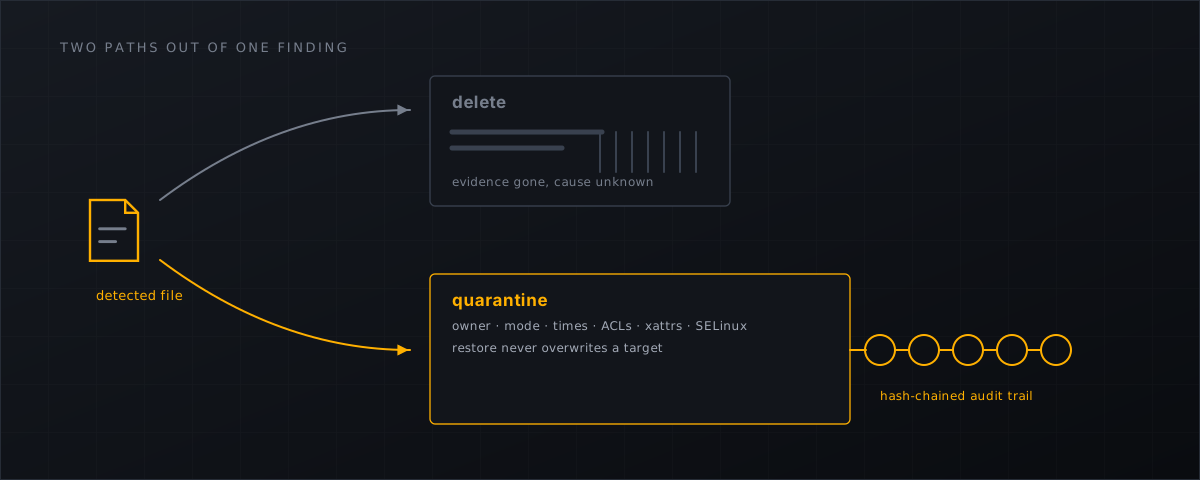
Two buttons, one irreversible. The choice between quarantining and deleting a detected file looks like an operational preference and is actually a decision about evidence, about how you handle being wrong, and — in the EU — about what you will be able to put in an incident report.
Deleting is the option that cannot be undone
Three things stop being available the moment the file is gone.
Your undo button. Detection is probabilistic. The NSA’s own web-shell repository says of broad detection rules that they “are likely to produce a significant number of false positive results” (nsacyber/Mitigating-Web-Shells ). A scanner that deletes on a heuristic hit will eventually take out a customer’s working file, and the restore path will be a backup and an apology.
Your investigation. The file answers questions you have not asked yet: is this the same shell as the one on the other account, when did it arrive, what did it call home to. A SHA-256 in a log is a much thinner answer than the file.
Your report. Under § 32 BSIG, entities in scope of the German NIS2 implementation face a 24-hour early warning, a 72-hour notification including indicators of compromise, and a final report within one month (BSIG 2025 ). The EU implementing regulation that fleshes those duties out for cloud, data-centre and managed-service providers expects incident documentation to draw on logs “from security tools, such as antivirus, intrusion detection systems or firewalls” (Commission Implementing Regulation (EU) 2024/2690 ). Those logs, and the artefacts behind them, are the evidence base. Deleting the artefact at 23:00 and reconstructing the story on Thursday is not a strategy.
What quarantine has to do to be worth the name
Moving a file to /root/quarantine/ with mv is not quarantine, because it loses everything you would need to put it back. A usable quarantine record keeps:
- the original path, owner (
uid/gid), mode, mtime and atime; - extended attributes, ACL and SELinux context where present;
- the SHA-256 and size of the payload, so identical files across accounts are recognisable;
- the finding it came from — verdict, confidence, the signals that fired, the rule set generation and policy generation in force at the time;
- who acted, when, and under which action.
Shelltrap’s quarantine store carries exactly those fields, the payload lives root-only outside every document root, and each action is written to a hash-chained audit log. Restore puts the file back with its original metadata and never overwrites an existing target — if something is at that path again, you get an error rather than a silent clobber.
Report first, then quarantine — but do get to quarantine
Starting in report-only mode is how you avoid the classic first-day disaster of a new scanner quarantining a busy shop’s payment include. Every hit becomes a finding and a notification; nothing moves.
shelltrap policy set global signature.action=report hash.action=report \
  heuristics.action=report upload.enabled=false
shelltrap policy get global
Report-only is a starting position, not a destination. BSI IT-Grundschutz OPS.1.1.4.A9 states that a malware scanner should block an infection automatically and report it to a central point (IT-Grundschutz OPS.1.1.4 ). Detection without action is a half-measure that a German auditor will notice.
The middle path is per-engine and per-domain. Signature and hash hits are high-confidence and can act early; heuristics stay in report far longer:
# high-confidence engines act, heuristics keep reporting, for one domain
curl --silent --unix-socket /run/shelltrap/api.sock -X PUT \
  -H 'Content-Type: application/json' \
  -H 'X-Request-ID: 5f1f8f3a2f7e4a5f9c1c9a2b7d3e4f50' \
  --data '{"signature.action":"quarantine","hash.action":"quarantine","heuristics.action":"report"}' \
  http://localhost/v1/policies/domain/42
Which findings tend to be wrong, and why heuristics deserve the longer leash, is set out in false positives in malware scanning .
Make the restore a support action, not an engineering one
The quality of a quarantine policy shows up on the day it is wrong. When a customer calls because a file they need is gone, the question is how many minutes it takes to put it back and who is allowed to do it.
In Shelltrap, quarantine and restore are visible in the CyberPanel plugin, and the scope is resolved by the broker rather than claimed by the browser: administrators can restore anything, resellers and end users only within their own sites. Permanent deletion stays with administrators. That combination lets first-line support undo a mistake without handing anyone root, which is usually the difference between a five-minute correction and an escalation.
When deleting is the right answer
Deletion is a decision, not an automatic consequence of detection. It is appropriate when:
- the finding is confirmed malicious and the customer has been informed;
- the retention period for that account has elapsed;
- data-protection retention rules require it — quarantined customer files are still customer data, and “keep everything forever” is not a defensible position either;
- an administrator takes the action deliberately, and it lands in the audit log.
In Shelltrap, permanent deletion of a quarantine entry is restricted to system and administrator actors, is subject to the retention check, and is audited. Retention itself is policy: quarantine.retention_days and findings.retention_days, set globally or per account or per domain.
Evidence survives the software
Uninstalling the scanner should not destroy the incident record. Removing the package leaves configuration, state, logs and quarantine in place, and even purge will not touch quarantined payloads unless you say so explicitly:
sudo apt-get remove shelltrap                        # quarantine preserved
sudo SHELLTRAP_PURGE_QUARANTINE=1 apt-get purge shelltrap   # quarantine removed, deliberately
That gate exists because “we removed the tool and lost the evidence” is a bad sentence to write in a report. The full removal and purge paths are documented in the installation docs .
What this means for CyberPanel operators
- Default to quarantine with retention, not deletion; make deletion a deliberate, audited administrator action.
- Run report-only for the first week on a new host — the tuning sequence is in the report-only first week — then promote the high-confidence engines first.
- Set
quarantine.retention_daysagainst your reporting obligations, not against disk price. One month is a reasonable floor if § 32 BSIG applies to you. - Make sure your restore path is a one-click operation your support team can run, and test it on a harmless file before you need it under pressure.
- Keep quarantine, findings and the audit chain together; the cleanup order that uses them is in the server-side backdoor removal checklist .
Shelltrap quarantines with full metadata, restores without overwriting, and records every action in a hash-chained audit log. See what it does .
Frequently asked
Does quarantine leave malicious code on the server?
The bytes stay, in a root-only store outside every document root, unreadable by the web server and not executable by the site. What is removed is the thing that made it dangerous: its presence in a path the web server serves.
How long should quarantine be kept?
Long enough to answer a customer’s question and to support an incident report. Retention is a policy value, so set it deliberately; in Germany, § 32 BSIG expects a final incident report within one month, which is a sensible floor.
Is report-only a permanent setting?
No. It is how you start. BSI IT-Grundschutz OPS.1.1.4.A9 expects a scanner to block an infection automatically and report it centrally, so the destination is quarantine — you just get there after a week of looking at findings rather than on day one.
Sources
Every number, date and vendor claim in this article links to one of these.
- nsacyber/Mitigating-Web-Shells (NSA repository) — accessed 2026-09-04
- BSI-Gesetz 2025 (consolidated text, § 32 reporting duties) — accessed 2026-09-04
- Commission Implementing Regulation (EU) 2024/2690 — accessed 2026-09-04
- BSI IT-Grundschutz-Kompendium 2023 — OPS.1.1.4 Schutz vor Schadprogrammen (PDF) — accessed 2026-09-04
More from the research desk
CyberPanel malware scanner setup with Shelltrap
Install a host-level malware scanner on a stock CyberPanel server: requirements, signed packages, report-only first, and …
AnalysisCyberPanel's security history, and what it teaches operators
Three pre-auth RCEs, a ransomware wave, a quiet 2025 and a busy 2026. What is verified about CyberPanel's incidents, and …
GuidesFind webshells on a CyberPanel server manually
A root-level triage playbook with find, grep, YARA and clamscan for CyberPanel hosts, including the honest limits of …
Shelltrap watches the files this article is about
Real-time detection, an upload gate in front of your PHP, explainable verdicts, and nothing leaving your server.