Guides
Shared hosting: the cross-account risk
Isolation and blindness are one property seen from two sides. What CageFS protects, what a per-tenant scanner cannot see, and how to sweep a whole box.
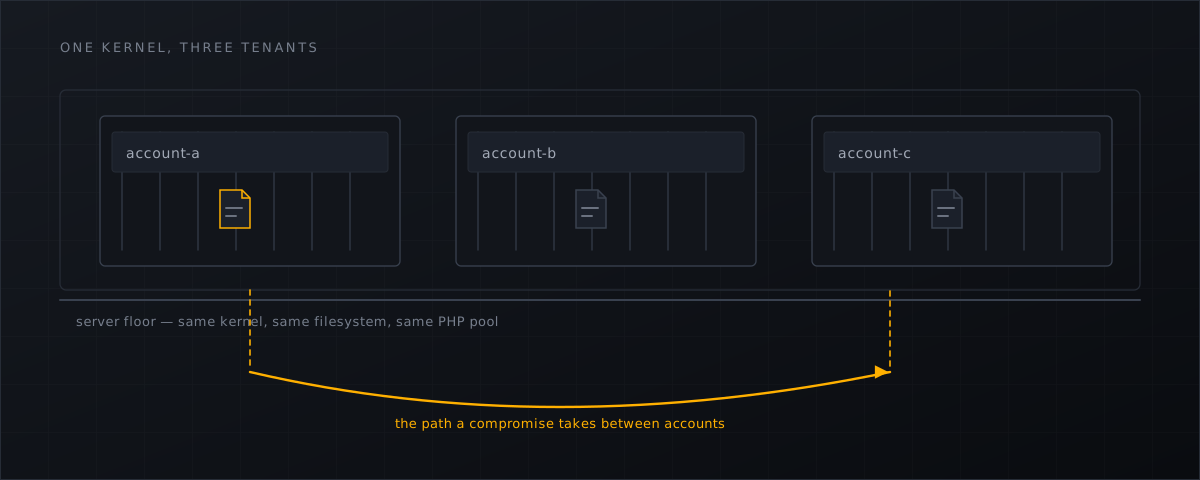
A customer reports a defaced site. You clean it, patch the plugin, rotate the passwords, and two days later it is back. The reason is usually not that you missed a file in that site. It is that you were looking at the wrong scope.
What isolation is for
CloudLinux describes CageFS in its own documentation, verbatim :
CageFS is a virtualized file system and a set of tools to contain each user in its own ‘cage’.
Among its stated benefits: a user “will not see any other users, and would have no way to detect presence of other users & their user names on the server”, and “will not be able to see server configuration files”.
That is excellent engineering and exactly the right control for the tenant. Now read the same list as negative space. The set of things CageFS exists to prevent is precisely the set of things a scanner running inside one caged account cannot see: the other accounts, their filenames, the server’s configuration. Isolation and blindness are the same property viewed from two sides. A per-tenant scanner is not weaker than a host-level one at cross-account work — it is not a participant.
That is not a criticism of any product. It is a consequence of Unix permissions, and it would be true of a per-tenant scanner we wrote ourselves.
The isolation you have may not be the isolation you assume
Worth stating plainly for CyberPanel operators: CageFS is a CloudLinux OS component. A stock AlmaLinux, RockyLinux or Ubuntu host does not have it. CyberPanel’s own knowledge base makes the dependency explicit in the context of Imunify360, verbatim :
Imunify360 is available with CyberPanel v2.0.0, but before using it you need to convert your operating system to CloudLinux OS.
So before reasoning about what an attacker in one account can reach, check what your box actually runs: separate Linux users per site, PHP running as the site owner, no group-writable shared directories, and whether symlink protection is on.
On that last point, CloudLinux’s SecureLinks “Prevents apache from serving files not owned by user, stopping symlink attacks against php config files” — and its documented default is off. Every mitigation for the symlink race sits at the kernel or web-server layer: kernel patch sets, the virtualised filesystem, the web-server-level link protection. None of them is available to something running as a PHP application inside one site. For this entire attack class, the application layer is not a weaker option; it is not an option.
The plumbing that turns one site into six
Three configuration details decide how far a single compromise travels, and all three are worth checking on an existing box rather than assuming they were set correctly when it was built.
One Linux user per customer, and PHP running as that user. If several customers share a UID, the boundary you are relying on does not exist. No shared writable directories between accounts — a group-writable upload or cache directory is a bridge. And separate accounts for separate risk: a customer running six sites in one account has, in practice, one site with six document roots as far as an attacker is concerned.
Why the backdoor is next door
MITRE catalogues web shells under persistence, T1505.003 , and persistence is the whole point: the attacker wants a way back that survives your cleanup. Sucuri’s 2023 Hacked Website Report found that 49.21% of compromised sites contained at least one backdoor at the time of infection — 2023 data, and the last edition to publish cleanup figures. If half of infected sites carry a way back, then on a server with dozens of sites per account, a cleanup scoped to one document root is a coin flip.
The practical pattern we see: a customer runs six sites in one Linux account, one gets exploited, a shell lands in each of the six, and the operator cleans the one that was reported.
Sweeping the whole box
Once you have one indicator — a filename, a SHA-256, an .htaccess line — sweep the fleet with it.
# the same file, anywhere else on the server
KNOWN=6f1f...b3
find /home/*/public_html -xdev -type f -name '*.php' -newerct '-30 days' -print0 \
  | xargs -0 sha256sum 2>/dev/null | grep -F "$KNOWN"
Then look for the structural weaknesses that let one account touch another’s files:
# world-writable files and directories inside document roots
find /home/*/public_html -xdev \( -type f -o -type d \) -perm -o+w \
  -printf '%M %u:%g %p\n' | head -50

# files inside a document root that are not owned by the site's own user
for d in /home/*/public_html; do
  owner=$(stat -c '%U' "$d")
  find "$d" -xdev ! -user "$owner" -printf "$owner <- %u %p\n" 2>/dev/null | head -5
done
Both commands are quick, and both regularly find something on a box that has been in production for a few years.
What a host-level layer adds
A daemon that sits below every account sees the fleet as one estate. Concretely, on a CyberPanel host, that means: one site index built from the panel’s own database; findings that can be correlated by SHA-256 across accounts, so the second copy of a shell is one query rather than another investigation; per-account caps so one noisy account cannot drown the others; and per-domain policies so a managed customer can enforce quarantine while a legacy site keeps reporting.
It also means the control is outside the reach of the thing it is watching — which matters because attackers do go after in-site security tooling; the documented cases and the architectural argument are in Wordfence versus a server-level scanner and why server-level webshell detection .
Access from the panel stays scoped: resellers and end users see only their own sites and can restore only within their own scope, and the broker resolves that scope server-side rather than trusting anything the browser claims.
What this means for CyberPanel operators
- Write down what your isolation actually is — one Linux user per customer or per site, PHP as the owner, symlink protection state — instead of assuming the model from a forum thread.
- Sweep by indicator across all accounts before closing an incident: hash, filename,
.htaccesspattern. - Fix world-writable paths and foreign-owned files inside document roots; they are the plumbing that turns one compromise into several.
- Put the detection layer below the tenant boundary, where the neighbours are visible; the cleanup order that assumes that scope is in the server-side backdoor removal checklist .
- Installation and the per-account scoping model are documented in the installation docs .
Shelltrap watches every customer root on the host, correlates findings across accounts, and keeps panel users inside their own scope. See what it does .
Frequently asked
Does CageFS stop a webshell?
It limits what a compromised account can see and reach, which is exactly what it is for. It does not stop the account from being compromised, and it does not give you visibility across accounts — by design, because that visibility is what it exists to remove.
We run stock AlmaLinux under CyberPanel. Do we have CageFS?
No. CageFS is a CloudLinux OS component. CyberPanel’s own documentation for Imunify360 states that you must convert the operating system to CloudLinux OS first, which is a good reminder that the isolation model people describe in forums is not necessarily the one running on your box.
Why does a cleaned site get reinfected?
Usually because the backdoor that reinfects it was never in the site you cleaned. Sweep the whole account and then the server by hash and filename before declaring an incident closed.
Sources
Every number, date and vendor claim in this article links to one of these.
- CloudLinux OS components documentation (CageFS, SecureLinks) — accessed 2026-09-04
- CyberPanel knowledge base — how to install and use Imunify360 on CyberPanel — accessed 2026-09-04
- Sucuri, 2023 Hacked Website Report — accessed 2026-09-04
- MITRE ATT&CK T1505.003 — Server Software Component: Web Shell — accessed 2026-09-04
More from the research desk
CXS alternatives in 2026: the honest field guide
ConfigServer closed on 31 August 2025. What replaced cxs, what the options cost as at 4 September 2026, and what runs on …
AnalysisCXS is gone: what CyberPanel operators should do next
Way to the Web closed on 31 August 2025. csf survived via GPLv3 forks, cxs did not. What that means for a stock …
GuidesCyberPanel malware scanner setup with Shelltrap
Install a host-level malware scanner on a stock CyberPanel server: requirements, signed packages, report-only first, and …
Shelltrap watches the files this article is about
Real-time detection, an upload gate in front of your PHP, explainable verdicts, and nothing leaving your server.