Analysis
Why webshell detection belongs on the server, not the site
Plugin scanners share the fate of the process they run in. What kernel docs, MITRE, the NSA repo and the BSI say about watching writes below the tenant.
There is a dishonest version of this argument: plugin scanners are bad, buy a server scanner. A competent reader can dismantle it in a paragraph.
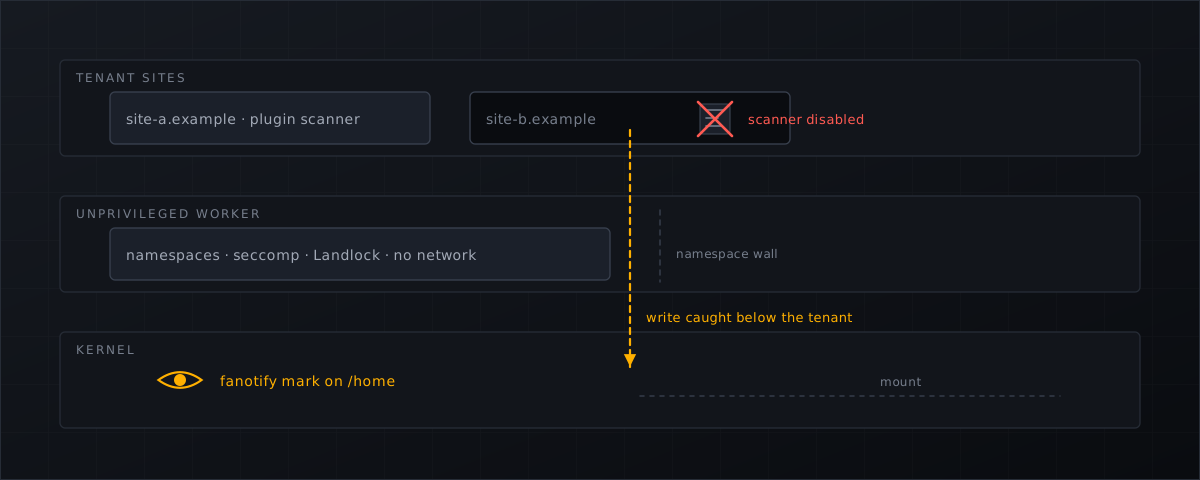
The real argument is narrower and much harder to rebut. A scanner that runs as a PHP process inside a customer’s website shares the fate of that process. When the site is compromised, so is everything in it, including the thing doing the scanning. That is a structural property, not a quality judgement, and it holds no matter how good the scanner is.
Everything below comes from third-party incident casework, the vendors’ own documentation, kernel manual pages, MITRE, an NSA repository and the German BSI.
Documented cases of the scanner being reached
Three independent Sucuri incident-response write-ups across four years describe malware attacking WordPress security plugins specifically.
2020 — the plugin killer. A kill loop in wp-load.php disables fifteen named security plugins, among them wordfence, sucuri-scanner, wp-cerber and ninjafirewall. Because wp-load.php runs on every page load, a reactivated plugin is disabled again on the next request. Sucuri’s conclusion: “Malware like this clearly demonstrates why it is so important to have a defense in depth security system that is not dependent solely on a plugin.” (Sucuri, 10 September 2020
.)
2022 — patching the scanner’s own source. An attacker modified wordfence.php and lib/wordfenceScanner.php, surgically deleting the warning strings “This file appears to be installed or modified by hacker to perform malicious activity” and “File appears to be malicious or unsafe”, and manipulated site_transient_update_plugin so the administrator could not see the plugin was out of date. Three backdoors were concealed, one inside wp-includes/Requests/Transport/ — a core directory, which only core-file integrity comparison surfaces (Sucuri, Ben Martin, 20 October 2022
).
Sucuri’s recommendation at the end of that post is the clearest statement of the principle we have found, and it comes from a company selling a competing product:
It would be helpful to have a file integrity monitoring service that resides mostly outside of the environment itself, like our server side scanning solution.
2024 — rename the directory, fake the UI. A fake plugin “renames the WordFence plugin directory to ‘wordfence1’ thereby disabling the plugin entirely”, creates an admin user license_admin2, and — the detail that lands hardest —
It searches for options ‘Scan theme files’ and ‘Scan plugin files’ and changes their style to make them look enabled (without changing the actual option).
(Sucuri, Ben Martin, 5 July 2024
.) The settings page still shows the scan as configured. Note what the attack required: a rename(), one filesystem operation available to anything running as the site user. No exploit of the scanner itself.
To be explicit about fairness: Wordfence is a good product and none of the above says otherwise. The three cases show that a control living inside the tenant is reachable by whoever compromises the tenant — true of every in-site scanner.
The constraints the vendor documents, and the latency gap
Wordfence is candid about the constraints. Its scan is “a PHP application”, and its troubleshooting page explains what that implies on shared hosting:
Some hosts limit memory across multiple processes or may have CPU usage limits over a period of time. These limits are not always obvious since they may not cause error messages in your PHP error logs, and may make the scan appear to just stop working.
The same page raises execution-time limits and “killer daemons” that terminate long-running processes; the scan options documentation notes the default scan scope is the WordPress root only, and that widening it is the change most likely to make a scan die on a constrained host.
That leads to the cleanest number-against-number comparison available. Both figures below are vendor defaults, not estimates.
| Detection interval | |
|---|---|
maldet
inotify_sleep — file events batch-scanned | 15 seconds (default) |
| Wordfence free tier , full scan | every 72 hours (plus up to one hour of jitter) |
| Wordfence Premium, full scan | every 24 hours |
Wordfence’s wording is unambiguous — “a quick scan runs every day, and a full scan runs every 72 hours” on the free version — and the same page recommends dropping to weekly on sites with limited resources.
Now set that against Patchstack’s measured five-hour weighted median time to first exploitation (Patchstack 2026 ). On the free tier, the worst-case window between a webshell being written and a full scan noticing it is longer than the median time for a vulnerability to be mass-exploited. Roughly four orders of magnitude separate the two intervals.
Filtering traffic does not close that gap either: in Patchstack’s tests, hosting-provider WAFs blocked 12% of WordPress-specific attacks, 26% in a broader test. That is evidence that prevention at a single traffic-filtering layer is unreliable — not an argument that hosts are bad.
Cross-account risk is answered below the application
On shared hosting, the isolation you want and the blindness you get are the same property seen from two sides.
CloudLinux describes CageFS as “a virtualized file system and a set of tools to contain each user in its own ‘cage’”, listing among its benefits that a user “will not see any other users, and would have no way to detect presence of other users & their user names on the server” (CloudLinux OS components ).
Read that as negative space. What CageFS exists to prevent is exactly what a scanner inside one caged account cannot see. It is the right answer for the tenant and simultaneously the reason a per-tenant scanner cannot be the host’s detection layer — a consequence of containment design, not a vendor admission.
The symlink race sharpens it. CloudLinux’s SecureLinks “Prevents apache from serving files not owned by user, stopping symlink attacks against php config files”, and its documented default is off. cPanel’s documented mitigations
for the same attack class are KernelCare patch sets, CageFS, SecureLinks and the Bluehost patch as a last resort.
Every one of those sits at the kernel or web-server layer. None is available to a plugin. For this attack class the application layer is not merely weaker — it is not a participant. Reinfection has the same shape: Sucuri documents that cleaning one site is insufficient when a neighbouring site on the same account or server still carries the backdoor that reinfects it (cross-contamination ).
What the neutral authorities actually say
MITRE ATT&CK classifies web shells as T1505.003 , a persistence technique: “Adversaries may backdoor web servers with web shells to establish persistent access to systems.” Its Linux detection analytic, AN1109, reads:
File creation of unauthorized script (e.g., .php, .sh) in /var/www/html followed by execution of unexpected system utilities (e.g., curl, bash, nc) by apache/nginx
MITRE names file creation in the web directory as the primary detection signal — an argument for watching writes, made by a neutral body rather than a scanner vendor. The honest caveat: the analytic pairs file creation with subsequent anomalous process execution, so file-write detection alone is one half of it. Its mitigations are cheap and unglamorous: consider disabling functions such as PHP’s eval() that may be abused for web shells (M1042), and limit privileges so only authorised accounts can modify the web directory (M1018). Paired with T1190, Exploit Public-Facing Application
, that gives the whole chain — vulnerable plugin, then webshell persistence — with a neutral citation at each step.
The NSA’s companion repository to its 2020 web-shell guidance states, verbatim:
The most effective method of discovering most web shells is to compare files on a production web server with a known-good version of that application, typically a fresh install of the application where available updates have been applied.
(nsacyber/Mitigating-Web-Shells .) On attribution: the joint NSA/ASD information sheet PDF and the CISA alert page both returned HTTP 403 to our fetcher, so these quotes come from the GitHub repository, which we did read, and not from the PDF. The technique described is known-good diffing, not signature scanning; our claim is only that a national security agency identifies filesystem-level inspection of the web root as the most effective method — a host-level control, not an application-level one.
The same repository is candid about heuristics, saying of its extended YARA rules that they “are likely to produce a significant number of false positive results.” That justifies a tiered design — cheap high-confidence signatures first, expensive heuristics gated behind them — and any vendor claiming zero false positives on obfuscation heuristics is contradicting the NSA. The repository also ships file-integrity rules that block changes to web directories, with the caveat that administrators should tailor rules before enforcing: the argument for a monitor-first, enforce-later rollout.
The German BSI puts it most plainly of anyone. IT-Grundschutz APP.3.2.A3, a Basis-Anforderung in the current 2023 edition, states:
Alle mithilfe des Webservers veröffentlichten Dateien MÜSSEN vorher auf Schadprogramme geprüft werden.
All files published by way of the web server MUST be checked for malware beforehand (BSI IT-Grundschutz-Kompendium 2023, APP.3.2 ). That is upload scanning, mandated at base level. Any mapping between that requirement and a particular product is our reading, not a BSI certification.
fanotify and inotify, in the kernel’s own words
First, this is not an exotic choice. Imunify360’s own configuration documentation describes its real-time scanning as using “fanotify as the primary monitoring mechanism (kernel 3.10+) with legacy inotify fallback” (Imunify360 config reference ). The market leader is on the same mechanism.
The fanotify(7) manual page says the API “provides notification and interception of filesystem events”, with three advantages:
the ability to monitor all of the objects in a mounted filesystem, the ability to make access permission decisions, and the possibility to read or modify files before access by other applications.
Two of those matter here. Permission events — FAN_ACCESS_PERM, FAN_OPEN_PERM, FAN_OPEN_EXEC_PERM — are “requests to the receiving application to decide whether permission for a file access shall be granted”, and denial makes the requesting call receive EPERM. A plugin-level scanner can only notice; a permission-event listener can refuse. And whole-tree coverage is race-free in the kernel’s own wording: monitoring mounts “offers the capability to monitor a whole directory tree in a race-free manner.”
By contrast, the inotify(7) manual page
states that “Inotify monitoring of directories is not recursive: to monitor subdirectories under a directory, additional watches must be created” — one watch per directory across thousands of customer directories, under a per-user ceiling in /proc/sys/fs/inotify/max_user_watches. It documents an inherent race window when adding a watch, and a queue that can overflow with IN_Q_OVERFLOW. To be precise about a claim that is often overstated: the page does not say inotify cannot deny an operation. It describes a notification-only API with no response mechanism. That is the accurate phrasing, and it is enough.
The caveats we have to publish, because they are real. The fanotify page states that it “does not catch remote events that occur on network filesystems”; that it “does not report file accesses and modifications that may occur because of mmap(2), msync(2), and munmap(2)”; and that “the event queue can overflow. In this case, events are lost.” So real-time watching must be paired with a periodic full sweep, and a pure real-time claim is not defensible. Create, delete and move events were added in Linux 5.1, a hard kernel floor for on-write detection.
One more paragraph there shapes architecture rather than features:
When an event is generated, no check is made to see whether the user ID of the receiving process has authorization to read or write the file before passing a file descriptor for that file. This poses a security risk, when the CAP_SYS_ADMIN capability is set for programs executed by unprivileged users.
A process holding CAP_SYS_ADMIN and receiving descriptors to arbitrary customer files is a large, attractive trust boundary.
What a sandboxed scanner architecture looks like
Shelltrap as the worked example, because it is the architecture we can describe factually rather than infer.
The privileged part holds no parsers. The root broker is a statically linked Go binary with no cgo, containing no YARA, no ClamAV code and no archive, Office or ELF parsing. It holds the fanotify groups, normalises events, opens files safely (openat2 with RESOLVE_NO_SYMLINKS where the kernel supports it, otherwise a component-wise openat walk with O_NOFOLLOW), hands scan jobs to workers, executes quarantine transactions and serves the local API — accepting opaque object IDs from the UI and CLI, never free-form paths.
The parsing part holds no privileges. The scanner worker runs as its own system user, with no network, in its own mount and PID namespaces, under seccomp, rlimits and cgroup limits, receiving a read-only descriptor from the broker over SCM_RIGHTS. Its pipeline is layered deliberately: magic-byte typing for prioritisation, then ClamAV over the clamd socket, then YARA 4.5 with rules precompiled per feed generation, then hash sets plus a known-good allow-list, and only then heuristics — obfuscation markers, PHP in upload directories, .htaccess and .user.ini handler tricks, symlinks pointing out of the home directory. A heuristic finding requires several independent signals, scored visibly per signal. That split exists because of the CAP_SYS_ADMIN paragraph quoted above, not in spite of it.
Uncertainty is a verdict. The states are clean, suspicious, malicious, unscanned and degraded. Files skipped for size, type or budget are reported as unscanned with a reason, never silently counted as clean; if clamd is unavailable the state is degraded. FAN_Q_OVERFLOW events are counted, alarmed and trigger a bounded reconciliation scan.
The upload gate closes the window before first execution. A thin PHP adapter loaded via auto_prepend_file acts only when $_FILES is non-empty, passes the temporary descriptors to the broker over a Unix socket and waits at most two seconds; on a malicious verdict it answers 403 and deletes the temporary file. Fail-open is the default, fail-closed is configurable per domain. Its known limit is documented rather than hidden: auto_prepend_file can be overridden by a .user.ini — itself one of the heuristic signals, with the fanotify watcher behind it as the catch-all.
Detection degrades visibly. Capability is probed at runtime rather than inferred from a kernel version, and hosts land in tiers, down to an unsupported tier where the product declines to promise real-time detection at all. “We cannot do this here” is a more useful answer than a dashboard that says clean.
What this means for CyberPanel operators
- Keep the plugin scanner, and stop treating it as the control of record. It is useful to the site owner. It is not the layer that survives the site being compromised, and three separate Sucuri investigations show attackers going after it directly.
- Compare intervals, not feature lists. Ask two questions of any vendor: what triggers a scan, and what is the worst-case delay between a file being written and someone looking at it. Fifteen seconds and seventy-two hours are both documented defaults in this market.
- Ask what happens when the event queue overflows. A vendor who cannot answer has either not read the manual page or is not telling you about the periodic sweep it needs anyway.
- Check the trust boundary. Anything doing YARA, archive and Office parsing inside a
CAP_SYS_ADMINprocess is one parser bug away from being the incident. Ask where the parsers run. - Map the requirement before the product. If you sell into Germany, APP.3.2.A3 is the standard your customers are measured against, and it is about files being checked before publication — not about which brand does it. Our analysis of the WordPress backdoor wave covers what those files look like; what CXS operators should do next covers the migration case.
The installation documentation sets out what Shelltrap probes on your host before it promises anything, including which tier your server lands in. Commercial terms are on the pricing page .
Frequently asked
Does this mean plugin scanners do not work?
No, and we do not claim that. The argument is architectural, not about product quality: a scanner that runs as a PHP process inside the site shares the fate of that process, and an attacker with write access to the site can reach it. Both layers are useful; only one of them survives the site being compromised.
Why fanotify rather than inotify?
The kernel’s own manual pages settle it. inotify is not recursive, needs one watch per directory, has a per-user watch ceiling and a documented race window, and is a notification-only API with no permission-event mechanism. fanotify can watch a whole mount race-free and can make access-permission decisions.
Is real-time watching alone enough?
No. The fanotify manual page states that the event queue can overflow and events are then lost, and that events triggered via mmap, msync and munmap are not reported at all. Real-time watching has to be paired with a periodic full sweep, and any vendor claiming pure real-time coverage is overstating it.
Does MITRE recommend file-write monitoring?
MITRE’s Linux detection analytic for web shells names file creation of an unauthorised script in the web directory as the signal — but it pairs that with subsequent anomalous process execution. File-write detection is one half of the analytic, not the whole of it.
Sources
Every number, date and vendor claim in this article links to one of these.
- Sucuri: WordPress malware disables security plugins to avoid detection (2020) — accessed 2026-09-04
- Sucuri: Wordfence evasion malware conceals backdoors (2022) — accessed 2026-09-04
- Sucuri: New variation of Wordfence evasion malware (2024) — accessed 2026-09-04
- Sucuri: The dangers of lateral movement and website cross-contamination — accessed 2026-09-04
- Wordfence Help: scan troubleshooting — accessed 2026-09-04
- Wordfence Help: scan scheduling — accessed 2026-09-04
- Wordfence Help: scan options — accessed 2026-09-04
- Linux Malware Detect (maldet) repository — accessed 2026-09-04
- CloudLinux OS components documentation (CageFS, SecureLinks) — accessed 2026-09-04
- cPanel documentation: symlink race condition protection — accessed 2026-09-04
- MITRE ATT&CK T1505.003 — Server Software Component: Web Shell — accessed 2026-09-04
- MITRE ATT&CK T1190 — Exploit Public-Facing Application — accessed 2026-09-04
- nsacyber/Mitigating-Web-Shells repository — accessed 2026-09-04
- fanotify(7) manual page — accessed 2026-09-04
- inotify(7) manual page — accessed 2026-09-04
- Imunify360 configuration file description (real-time scanning) — accessed 2026-09-04
- Patchstack, State of WordPress Security in 2026 — accessed 2026-09-04
- BSI IT-Grundschutz-Kompendium 2023, APP.3.2 Webserver — accessed 2026-09-04
More from the research desk
fanotify vs inotify for file monitoring
Two kernel APIs, two very different guarantees. What the man pages actually say about recursion, races, permission …
GuidesFind webshells on a CyberPanel server manually
A root-level triage playbook with find, grep, YARA and clamscan for CyberPanel hosts, including the honest limits of …
GuidesHow webshells get into WordPress uploads
Arbitrary file upload, polyglots and .htaccess handler abuse: the routes a PHP backdoor takes into wp-content/uploads, …
Shelltrap watches the files this article is about
Real-time detection, an upload gate in front of your PHP, explainable verdicts, and nothing leaving your server.