Product
Shelltrap on cPanel: what works today, what is beta
cPanel/WHM support landed in Shelltrap 0.3.0. What is identical to the CyberPanel build, what is deliberately different, and what the word beta is doing on the label.
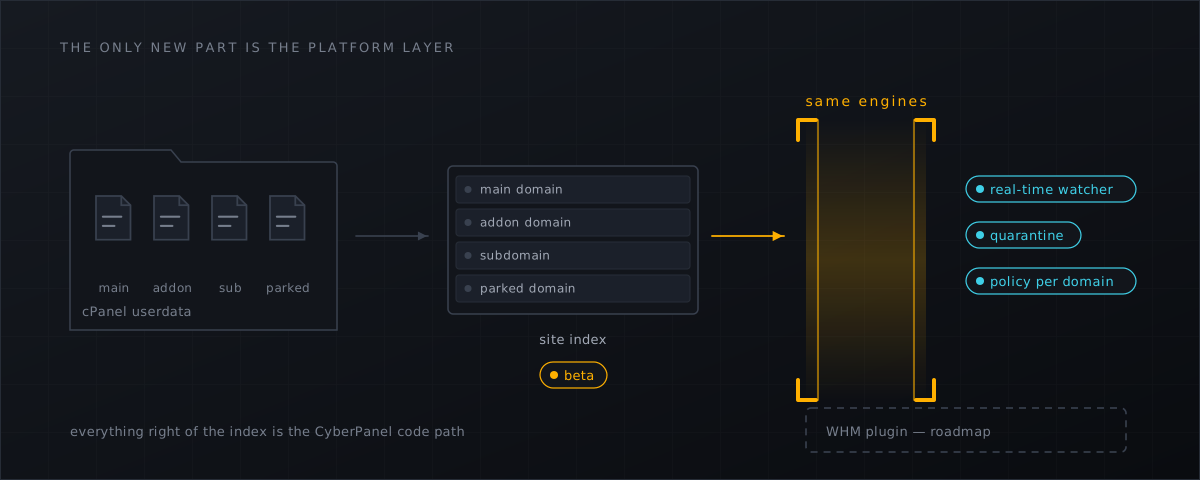
Shelltrap was built for CyberPanel, for a specific and slightly parochial reason: that is what we run. The gap we were filling was our own. But the machinery underneath — a fanotify watcher, a parser-free root broker, an unprivileged scanning worker, signed rule generations, a quarantine transaction that survives a crash — was never CyberPanel-specific. Only one thin layer was: the part that answers the question which directories on this box belong to which customer.
Release 0.3.0 adds a second answer to that question, and with it cPanel/WHM support on AlmaLinux 8 and 9 and on Ubuntu 22.04 and 24.04. It carries a beta label, and this article is about what that label does and does not mean.
What is identical
If you have read the product page , you have already read the cPanel build. There is no reduced edition and no separate SKU. On a cPanel host you get:
- Real-time detection through fanotify — every write, move, creation, deletion and attribute change under the customer roots, with queue overflow counted and answered by a bounded reconciliation scan rather than swallowed.
- The same privilege split. The root broker holds the fanotify groups and no parsers; the worker holds the parsers, runs as its own user in its own mount and PID namespace with seccomp, Landlock, rlimits and cgroup limits, and has no network at all.
- Every engine. ClamAV over the clamd socket in the Full profile, YARA 4.5 precompiled per rule generation, hash sets with a known-good allowlist, and heuristics that need several independent signals before they say anything.
- The five verdicts, including
unscannedanddegraded, which are never quietly counted as clean. - Quarantine as a transaction, with a restore that puts back owner, mode, times, ACLs, extended attributes and the SELinux context, and never overwrites an existing file.
- Policies per domain, with global → account → domain inheritance you can read with
shelltrap policy effective. - Signed feed generations with per-rule provenance, corpus gating and automatic rollback on a quarantine storm.
- One licence per server, at the same price, with the same activation command.
- The same data residency. Files never leave the machine. Two outbound connections exist: the licence check and the signed feed download, both terminating in Germany.
What is new: the platform layer
On start-up the daemon works out which panel it is sitting on, and it does not need to be told. On a cPanel host it builds its document-root index from the cPanel userdata, covering the four shapes an account can take:
| cPanel concept | What the index does with it |
|---|---|
| Main domain | its own site, with document root and owning account |
| Addon domain | its own site, with its own policy scope |
| Subdomain | its own site, with its own policy scope |
| Parked domain | resolved to the document root it points at |
That index is what turns a kernel event into a sentence a human can act on. A raw fanotify event says a file changed on a mount; the index turns it into this file, in this domain, owned by this account, under this policy. Events are mapped by the longest matching document-root prefix, and files outside every document root — mail, backups, the home root — fall under the account policy rather than dropping out of scope.
Check it before you rely on it:
shelltrapd --config /etc/shelltrap/shelltrap.toml --check
shelltrap status
status prints the number of indexed sites. If that does not match what WHM shows you, that is a
bug worth an email rather than a workaround.
What is deliberately different
Two things, and both are on the label rather than in the small print.
There is no WHM plugin
On CyberPanel, the plugin gives administrators, resellers and customers a dashboard, findings with their signals, quarantine and restore, per-domain policies and feed state, with the role model the panel already enforces. On cPanel, none of that exists in a browser yet.
What exists instead is the interface the plugin itself uses: the CLI over a local Unix socket, and the local HTTP API behind it. Nothing is out of reach — findings, signals, quarantine, restore, policies, ignore rules, feed generations, audit, jobs and health are all there:
shelltrap health
shelltrap findings list --json
shelltrap findings show <finding-id>
shelltrap quarantine list
shelltrap policy effective <site-id>
A WHM plugin is on the roadmap. It does not have a date, and we are not going to invent one; the changelog is where it will appear when it is real.
The PHP upload gate is optional and off by default
On a LiteSpeed host, the synchronous gate in front of PHP is one of the most useful things Shelltrap does: a malicious upload gets HTTP 403 and a deleted temporary file before the application ever sees it.
On cPanel with EasyApache 4 and PHP-FPM, the same adapter is available but off by default, and turning it on is a deliberate per-host decision. With it off, those files are not unwatched — the real-time watcher sees them a moment after the write instead of synchronously before the request finishes. That is a real difference and it is stated in the finding rather than glossed over: a scanner that quietly downgrades from prevention to detection while still using the word “protection” is the kind of thing this product exists to be the opposite of.
What “beta” means here
Not “new and exciting”. Something narrower:
The cPanel platform support is implemented against the cPanel file format and tested against fixtures. It has not yet accumulated long-term operation on live cPanel hosts.
Two consequences worth being explicit about.
The risk is concentrated in one layer. The engines, the verdict model, the quarantine transaction, the feed verification and the licensing have operating history. Site discovery on cPanel does not. If something surprising happens, that is where to look first, and it is the layer whose failure mode is “a domain is missing from the index” rather than “a customer file was deleted”.
Report-only is not a formality. It is how we run new things on our own production hosts, and on a cPanel box it should run longer than you would give the CyberPanel build:
shelltrap policy set global signature.action=report hash.action=report \
  heuristics.action=report upload.enabled=false
Record everything, move nothing, verify every malicious finding by hand, write down your own
false-positive rate — and only then switch actions on, domain by domain. If a finding is wrong,
reporting it
is automated and usually answered within an hour.
Why bother, if cxs is only “no longer sold”
Because nothing breaks the day sales stop, and that is the trap. ConfigServer eXploit Scanner is
no longer sold
(checked
4 September 2026). An unmaintained scanner does not go red; it keeps reporting clean with
steadily less right to, while its signature feed falls behind what is being uploaded this month.
The decay is invisible until somebody else finds the shell for you.
The wider ConfigServer estate did not vanish — cPanel took over CSF with its own fork from 25 February 2026 — but the exploit scanner is a separate product and a separate gap. The commercial alternative most cPanel operators will be quoted is Imunify360, at 12 to 45 USD per month depending on user count (checked 4 September 2026). Shelltrap is 14.90 EUR a month or 149.00 EUR a year including German VAT, per server, with domains and accounts not counted — and, for the operators who care about that, scanning that happens on the machine rather than anywhere else.
We are not going to tell you it detects more. Nobody can defend that number, ours included.
Getting started
Five steps, no different from CyberPanel except for the package list:
- Fetch the core package from the download page
with your licence key. There is no
shelltrap-cyberpanelpackage on a cPanel host. shelltrap license activate STL-…- Let the daemon detect the platform, then check the site count with
shelltrap status. - Run the first scan in report-only and read what it says.
- Allowlist
sentinel@shelltrap.com, which is where findings are mailed from.
The full version, with the profile decision and the systemd drop-ins, is in installation and first run , and the product-side summary is on Shelltrap for cPanel .
Frequently asked
Is the cPanel build a different product?
No. It is the same daemon, the same packages and the same licence. What changed in 0.3.0 is a platform layer that recognises cPanel and reads the site list out of the cPanel userdata instead of the CyberPanel database. Everything behind that layer is the code that has been running on CyberPanel hosts.
Why is there no WHM plugin?
Because we would rather ship the scanner than hold it back for a user interface, and because the CLI and the local API already expose every operation the panel plugin performs. A WHM plugin is on the roadmap and deliberately has no date attached.
Should I run it on a production cPanel host?
In report-only, yes — that is exactly what report-only is for. With actions switched on, treat it the way you would treat any new scanner on a box with paying customers: watch it be right for a couple of weeks first, then enable actions domain by domain.
Sources
Every number, date and vendor claim in this article links to one of these.
- configserver.org — ConfigServer eXploit Scanner product page — accessed 2026-09-04
- cPanel — cPanel will provide its own fork of CSF starting 25 February 2026 — accessed 2026-09-04
- Imunify360 pricing — accessed 2026-09-04
- fanotify(7) manual page — accessed 2026-09-04
More from the research desk
CXS alternatives in 2026: the honest field guide
ConfigServer closed on 31 August 2025. What replaced cxs, what the options cost as at 4 September 2026, and what runs on …
AnalysisCXS is gone: what CyberPanel operators should do next
Way to the Web closed on 31 August 2025. csf survived via GPLv3 forks, cxs did not. What that means for a stock …
GuidesCyberPanel malware scanner setup with Shelltrap
Install a host-level malware scanner on a stock CyberPanel server: requirements, signed packages, report-only first, and …
Shelltrap watches the files this article is about
Real-time detection, an upload gate in front of your PHP, explainable verdicts, and nothing leaving your server.